| Detail | What happens |
|---|---|
| What a rule matches | The visitor’s country only, not a region, state or city |
| Clicks and QR scans | Both follow the same country rules |
| A country with no rule | The visitor opens the link’s main destination |
| Plans that include it | Pro ($34 a month) and Elite ($260 a month) |
| Rules for mobile or desktop visitors | A separate setting: redirect by device |
| Changing a rule later | The short link and any printed QR code stay the same |
Here is an example set-up. An author wants one “buy the book” link for a newsletter read in several countries. The link gets three country rules: United Kingdom opens the book on amazon.co.uk, United States opens amazon.com and Germany opens amazon.de. A reader in Canada matches none of them, so the link opens its main destination, the author’s own site with every retailer listed.
How do I add geo targeting?
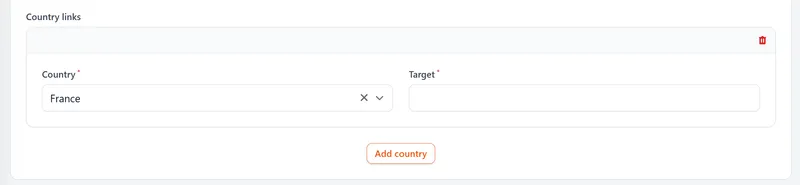
On a Pro or Elite plan, open the short link or QR code and switch on the "country based redirects" toggle. A Country links panel appears: choose a country from the Country menu, paste the address it should open into the Target box, then press Add country for the next one.
How does geo targeting work?
You create one short link and add a rule for each country you want to send somewhere different. When someone clicks or scans, the system checks their country against those rules and sends them to the page you chose. This keeps people on the right site without manual steps. It also avoids the common issue of customers landing on the wrong market.
Why brands use geo targeting
Many brands run sites for different countries. Some use different languages. Others charge different prices in each country. Geo targeting keeps those audiences separate and tidy.
People land on the right store straight away, which reduces confusion and cuts drop-off. It also means you can run global campaigns without creating dozens of links.
Not every international campaign needs a country rule. The test is whether each market already has a page worth sending people to: a .co.uk basket beside the .com one, a support site written in two languages, a ticket page for each leg of a tour. Where one page serves everyone, a rule has nothing to choose between, and no rule can divide an audience inside a single country however many pages you have. The plans that carry country rules are Pro, at $34 a month, and Elite, so how many markets one link must serve is the question to answer before the plan.
Can I target a region, state or city?
No. Rules match on country only, so a single rule covers the whole country. If shoppers in different US states need different pages, point your United States rule at a page where they choose their state.
Works for links and QR codes
Geo targeting applies to clicks and scans. If someone scans your QR code in Spain, they can go to your ES store. If someone scans in France, they go to your FR store. You can use the same QR code in all countries, which simplifies print and packaging.
Which plan includes geo targeting?
Geo targeting is part of the Pro plan ($34 a month) and Elite ($260 a month). The free plan can’t add country rules, but its report already counts clicks by country, which is a free way to find out whether a second market sends enough traffic to deserve its own page. The clicks and scans by country map shows how that report looks, and our pricing page compares Pro with Elite.