NEWBroken Link Checker, on Pro and Elite: we check your short links and QR codes every day and flag any that break.See how it works →Broken Link Checker is here →
Home › Features › Statistics Analytics And Reporting

Tracking and Reporting for Your Short Links and QR Codes

To track clicks on short links and QR codes in LinkShortener.io, open the report that each one comes with. A scan of a QR code is counted the same way as a click on a link, and even on the free plan the report shows this week's clicks, the all-time total, clicks by country, desktop versus mobile, and the busiest hours (UTC) and days.

Written by the LinkShortener.io team · Reviewed by Shaun Reynolds, Founder · Last reviewed September 2026

Quick answer

Link reporting is the record of what happens after someone opens your short link or scans your QR code. LinkShortener.io is a link tracker for both on every plan, Free included: each click and scan is logged with no monthly cap, and you can filter the report to Today, This Week, This Month, This Year or Last Year. Pro and Elite subscribers see this very report too, with no extra analytics tier on top.

A link tracker is a short link that counts each click on its way to your page, so you can see how many people opened it, from which country and at what time of day. On LinkShortener.io every short link and QR code works as one, on the free plan as well as the paid ones.

What the free link tracker records
FigureWhat the report shows
This weekClicks and scans so far this week, and how far that is up or down on last week
All timeEvery counted click and scan since the link or QR code was made
CountryWhere each click came from, drawn on a map
Desktop or mobileClicks from desktop and from mobile, which the timeline lets you switch between
Busiest timesThe hours (UTC) and days of the week that bring in the most
BotsKnown bots and crawlers, and requests with no user agent, left out of the figures
HistoryKept for as long as your account is open, with no 30-day or one-year cut-off

Are bot clicks counted in my reports?

No, not the ones that identify themselves. A click normally arrives with a user agent, the short line of text in which a browser or program names itself, and LinkShortener.io reads it before the click reaches your report. Known bots and crawlers are dropped from the count, and so is any request that arrives with no user agent at all.

That matters most while a link is new. Post a short link on a public page or drop it into a group chat and automated visitors turn up quickly: search engine crawlers following it, and link-preview bots fetching the page to draw a preview card. Left in, they would make a quiet link look busy. The filter goes by what the software says about itself, though, so a tool dressed up as an ordinary browser is counted like a person, and we don't claim to catch every automated click.

How far back does my click history go?

For as long as your account stays open, on the free plan and on paid plans. Old clicks are not trimmed after 30 days or a year, so a link's total still holds every counted click from the day it was made, and the This Year and Last Year filters have a complete record to work from.

Say a garden centre in Whitstable printed a QR code on its spring catalogue in March 2025, then a fresh code on the 2026 catalogue. In April 2026 it can open the old code's report, choose Last Year and see that first season in full, then open the new code and read This Year while the 2026 catalogue is still on the counter.

Old links keep adding to that history. In our click study, which adds up 2,056,596 clicks made between 18 July 2023, the earliest record, and 21 September 2026, links aged 31 to 90 days drew 12.1% of all clicks, links aged 91 to 365 days drew 5.4%, and links more than a year old still drew 1.7%.

Where do I find the report for a link or QR code?

In the Links or QR Codes list in your account's side menu, press View next to the one you want. The report opens on its headline figures: total clicks or scans, and the count for this week with how far it has gone up or down since last week.

Further down, the Clicks section draws a timeline you can switch between desktop and mobile and narrow to one of the five preset periods, from Today to Last Year. The same page holds the country map and the charts of the busiest days and hours, with hours given in UTC. The map has a guide of its own: clicks and QR scans by country on a map.

Before you open any single report, the dashboard gives the account-wide picture: a This Week tile and an All Clicks tile add up clicks across everything you have made.
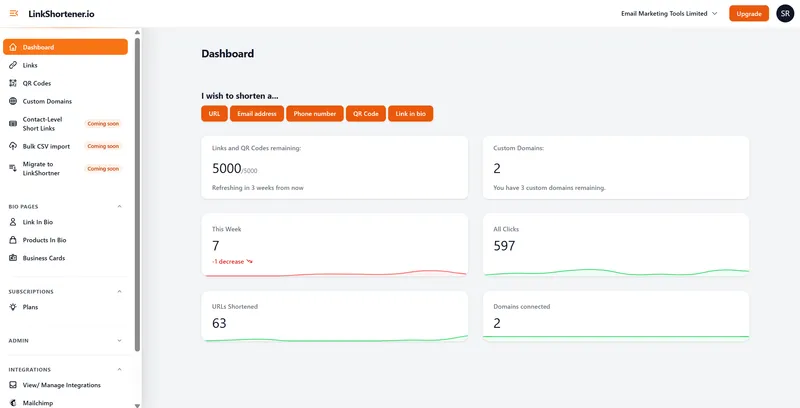
LinkShortener.io account dashboard with a This Week tile reading 7 and a -1 decrease, an All Clicks tile reading 597, and tiles for links and QR codes remaining, custom domains, URLs shortened and domains connected
The account dashboard: This Week and All Clicks cover the whole account, while the report behind each link's View button splits its own clicks by country, desktop or mobile, day and hour. Captured on an older build, so a few side-menu items tagged coming soon have gone live since.

How are QR code scans tracked?

Each scan is recorded as a click, because a QR code that opens a web address in LinkShortener.io carries a short link. The scan lands in the code's own report with the same free figures. Nothing needs switching on: make a trackable QR code and it counts from the first scan.

Printed mail is where this earns its keep, because a letter sends back no data of its own. A charity that posts an appeal letter on a Tuesday, carrying one QR code to its donation page, can open that code's report the following week. The busiest-days chart shows when the letters were landing and being read, and once this week's figure drops well below last week's, the response has mostly run its course and a reminder can go out.

A one-person marketing team, a club treasurer or a small shop has no need to pay for counting: every click and every scan is recorded on the free plan with no monthly cap. Where the reporting stops is the click itself. A sale, a sign-up or a completed form is never part of the figure, because a LinkShortener.io report holds clicks and scans and nothing that follows them, and a single link cannot be split down the middle to test two landing pages against each other. Tag the destination address with UTMs and your own analytics picks the story up from there.

Good to know

Link reporting FAQs

What is link reporting?

Link reporting is the record of what happens after someone taps your short link or scans your QR code: total clicks and scans, plus where, when and on what device. LinkShortener gives every link a report of its own.

Is link reporting free?

Yes. Every plan, including the free one, includes unlimited click and scan tracking, and there is no cap on the clicks you can record. Nothing in the report is held back for paying customers either: Pro at $34 a month and Elite show the same figures as Free.

What does a link report show?

The all-time total of clicks and QR scans, this week's count, the countries behind them, how they split between desktop and mobile, and the hours (UTC) and days with the most activity. Every one of those is on the free plan.

What should I compare when choosing a URL shortener for click analytics?

Compare what each free report shows, whether tracked clicks are capped and how often figures refresh, then hold LinkShortener.io to the same test. Even on the free plan, its report breaks clicks down by country, divides them into desktop and mobile, names the busiest days and UTC hours, and gives this week's clicks as well as the running total. It never caps clicks, and a fresh click shows up once it has been processed and you reload the page. Pro, at $34 a month, gets exactly the same report.

Can I track QR code scans as well as link clicks?

Yes. QR scans are reported alongside link clicks in the same dashboard, giving you one combined view of every touchpoint.

How do I make a free tracking link?
  1. Open a free LinkShortener.io account, which asks for no card.
  2. Paste the long web address into the shortener, create the link and copy the short link it gives back. On the free plan it sits on the shared tli.sh domain.
  3. Share it, or print the matching QR code that comes with every short link, so one count covers a flyer as well as a text message.
  4. Press View beside the link in your Links list. Its report starts counting at the first click.
Can I send link reporting data to Google Analytics?

Not directly. Google Analytics is not one of our integrations, and the click report does not break clicks down by UTM tag. Put the UTM tags on the destination address instead: everything after the question mark is passed on unchanged when the short link redirects, so the visits arrive in your own Google Analytics labelled with source, medium and campaign.

Does click tracking stop when I hit the free plan limit of 20 links a month?

No. The 20 a month allowance on the free plan caps how many short links and QR codes you create combined, not how many clicks and scans they record. Links you have already created keep tracking, and click and scan tracking is unlimited on every plan. Clicks are never charged for on any plan. If you need more than 20 new items a month, the Basic plan raises that to 350 for $13 a month: see LinkShortener.io pricing.

Can I compare two date ranges in a link report?

No. Reports filter to one period at a time across 5 ranges: Today, This Week, This Month, This Year and Last Year. For period-on-period movement, the headline figures show clicks and scans this week and how that compares with last week.

How do I count taps on my link in bio buttons?

Give the button a LinkShortener.io short link as its address. Every tap on the button is then a click on that short link, so it shows up in the link's report with the same country, desktop or mobile, and day and hour figures. Building a link in bio page needs the Basic plan, at $13 a month.

Is there a mobile app for checking reports?

Not at the moment. LinkShortener.io is designed for desktop use, but the analytics dashboard also opens in any mobile browser, so you can check a link's report from your phone.

Sign up today for free!

Open a free account, with no card needed, and the report for your first short link or QR code starts counting from its first click.