NEWBroken Link Checker, on Pro and Elite: we check your short links and QR codes every day and flag any that break.See how it works →Broken Link Checker is here →
Home › Features › Pages › Product In Bio Pages

Product in bio pages

Put your products, prices and buy buttons behind the one link in your social bio.

Written by the LinkShortener.io team · Reviewed by Shaun Reynolds, Founder · Last reviewed September 2026

Quick answer

A Product in Bio page from LinkShortener.io turns your social bio into a mini shopfront for your products and current offers. It comes with Basic ($13 a month), Pro and Elite, not Free. Build it from content blocks for product images, prices and buttons, and set its colours and background to suit your brand.

  • Setting up: the create form asks for a title and a slug (both required), a header image (1200 × 400 px recommended) and an optional product logo.
  • Checkout: each product button opens the product URL you enter, so shoppers pay through your own shop.

A typical link in bio holds social channel links, the latest blog post and a newsletter sign-up. That works as a directory, but it falls short when you want one page that highlights your most popular products and current special offers, with you in full control and the focus kept on what you sell.

Create a Product Page That Matches Your Brand

Your Product in Bio page can be styled to fit your brand’s look and feel.
Everything from colours to backgrounds can be adjusted.

Page Features:

  • Editable title and slug for clean URLs

  • Add a header image, product logo and description

  • Full styling controls, including:
    • Text colour
    • Title colour
    • Description colour
    • Button colour and button text colour
    • Block background colour
    • Page container background colour
    • Page background colour
  • Add custom background images or choose from a background gallery
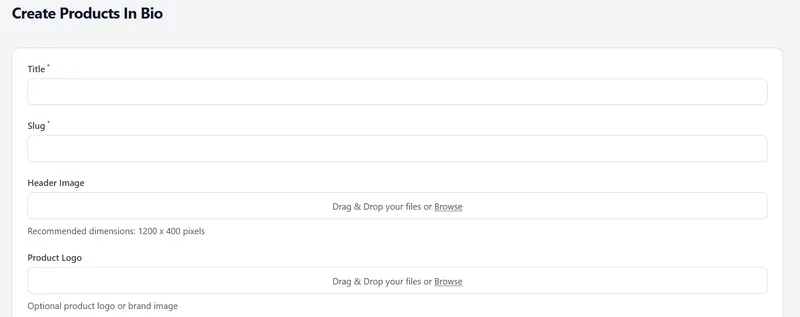
LinkShortener.io Create Products In Bio form with required Title and Slug fields, a Header Image drop zone recommending 1200 x 400 and an optional Product Logo upload
The Create Products In Bio form in the LinkShortener.io app.

Having a product in bio landing page does offer a lot to the visitor, but they need to feel safe and comfortable that the page they are visiting really belongs to the brand they are viewing. That is why styling and customisation matter so much here. Adding your logo at the top isn’t enough on its own; adjusting the button colours and page styling helps visitors engage and stay on the page.

Build with Simple, Flexible Content Blocks

The Product in Bio page builder uses content blocks that let you design your mini shop exactly how you want it.

Available Blocks:

  • Product Block: image, product title, product price, product URL, button text and button colour
  • Title Block: custom text and adjustable text size
  • Button Block: URL destination, custom text and colour

You can mix and match blocks to create your own flow. For example, start with a featured product, follow with a headline, then add more product blocks or a call-to-action button.

Content blocks are how you shape the page, and mixing them well gives visitors a page that feels easy to shop. Running a special offer? Put it in a product block, with its own image, at the top.

Got new stock for your “new arrivals” section? Add a title block that says so and list the new items underneath, ready for visitors to see and tap.

Designed for Creators, Retailers, and Small Brands

Digital downloads, a boutique’s autumn stock or a small batch of prints all fit, as long as each product has a page of its own to send shoppers to.

You can link straight to product pages, add a limited offer for a weekend, or change the blocks when your range changes.

How can I make my link in bio shoppable?

To make your link in bio shoppable, point it at a product in bio page rather than a plain list of links, so each item gets its own photo, price and buy button. You need Basic ($13 a month) or a higher plan for this.

  • Open Products in Bio in the app and create a new one.
  • Add a product block for each item you want to sell.
  • Set each product block’s own button colour so its buy button is easy to spot against the block background, then save the page and paste its link into your profile’s link field.

How do I track clicks on each product in my bio?

Each product’s click count comes from its block’s product URL field: put a LinkShortener.io short link made for that one item there, not the shop’s own address. A button that points straight at the shop’s address isn’t counted, because taps on a bio page are only counted through a short link.

A ceramics seller puts three buttons on her page (a speckled mug, a drip-glaze vase and a gift set). Open the vase’s short link in her click reports and she can see how many taps it has had this week and since she added it, a count by country, the mobile-versus-desktop split, and which hours (UTC) and days of the week bring the most. She can read all of it without upgrading; a Pro or Elite account would show her the same figures. If the vase’s busiest day turns out to be Sunday, Sunday is when to put it in an Instagram Story.

While that Story is up she can reload the report now and then, and new taps on the vase show up once they have been processed. Taps from known bots and crawlers aren’t in her totals.

When the gift set sells out and comes off the page, its short link’s click history stays in her account for as long as the account is open. The three links also use just 3 of the 350 short links or QR codes Basic gives her each month.

Taps show interest, not orders. To see which taps became sales, add UTM tags to each short link and follow the visit through in your shop’s own analytics. Shopify’s Sales attributed to marketing report, for example, includes sales from visits that arrive with UTM parameters.

Do all the products have to come from the same shop?

No. The product URL is set on each block rather than on the page, so every item can open wherever it is really sold. The ceramics seller above could send the mug to her own online shop, the vase to its listing on a craft marketplace and the gift set to a pre-order form, and her followers still find all three on one page.

Whichever shop an item opens in, use that listing’s own photo as the block’s image. A follower who taps a speckled mug and lands on a picture of that same mug knows straight away they are in the right place; a different angle can leave them wondering whether it is the same item.

If one item is on sale in two places, link only one of them. Two buttons for the same mug ask a shopper to pick a shop before they have decided to buy.

Is a product page the right fit for your bio?

A product in bio page works when a whole range shows on one screen and each item already has a page of its own to buy from. A maker with six prints or a coach with three courses is in that position; a catalogue that needs search and categories has outgrown it. Free accounts cannot build one at all, because these pages begin on Basic at $13 a month.

What is a product in bio page?

A product in bio page is a mini landing page built for selling, linked from your social bio. Instead of a plain list of links, it displays your products with images, prices and buy buttons, making it a shoppable link in bio that acts like a small shopfront.

How is a shoppable link in bio different from a normal link in bio?

A standard link in bio page gathers your channels, blog and newsletter in one place. A shoppable product in bio page narrows the focus to products, giving each item its own image, price and button, so a follower gets from your profile to a product page in two taps.

Can I track which products get the most clicks?

Yes: the product whose short link has the highest total is the one shoppers tap most, as long as that link sits only in its block’s product URL field.

Do shoppers check out on LinkShortener.io?

No. A product block’s button opens the product URL you type in, so the order and payment go through your own shop, such as a Shopify or Etsy store. The price on the page is the one you type into the block, so change it there when your shop’s price changes.

Sign up today for free!

Start with free short links and QR codes (20 a month in total); product in bio pages come with Basic and above.