NEWBroken Link Checker, on Pro and Elite: we check your short links and QR codes every day and flag any that break.See how it works →Broken Link Checker is here →
Home › Features › QR Codes › QR Code Templates

QR Code Pre-Built Templates

QR code templates are ready-made designs in the LinkShortener.io app: add your link, pick the Instagram, YouTube or Deliveroo preset, and the code takes that platform's colours and centre icon.

Written by the LinkShortener.io team · Reviewed by Shaun Reynolds, Founder · Last reviewed September 2026

Quick answer

LinkShortener.io includes pre-built QR code templates on the Pro plan ($34 a month) and on Elite. Each preset colours the code in a platform's own style and puts that platform's icon in the centre, with one each for Facebook, Instagram, TikTok, WhatsApp, X, Snapchat, LinkedIn, YouTube, Google Maps, Just Eat, Grubhub and Deliveroo. Add your destination URL, choose the preset on the Design step and the code is ready to download.

Say a bike shop wants its window poster to open its YouTube channel of repair videos. Give the code a name, paste the channel address as the destination, then on the Design step pick the YouTube preset (a red code with the play logo in the middle) and download the code.

UTM tags are optional and matter most when a code opens a website you run analytics on; for a channel, watch the scan count in your LinkShortener.io report. Make one test scan before the poster goes to print, then reload the report to check it has been counted. Our YouTube link shortener guide covers which channel or video address to paste.

Which platforms have a QR code template?

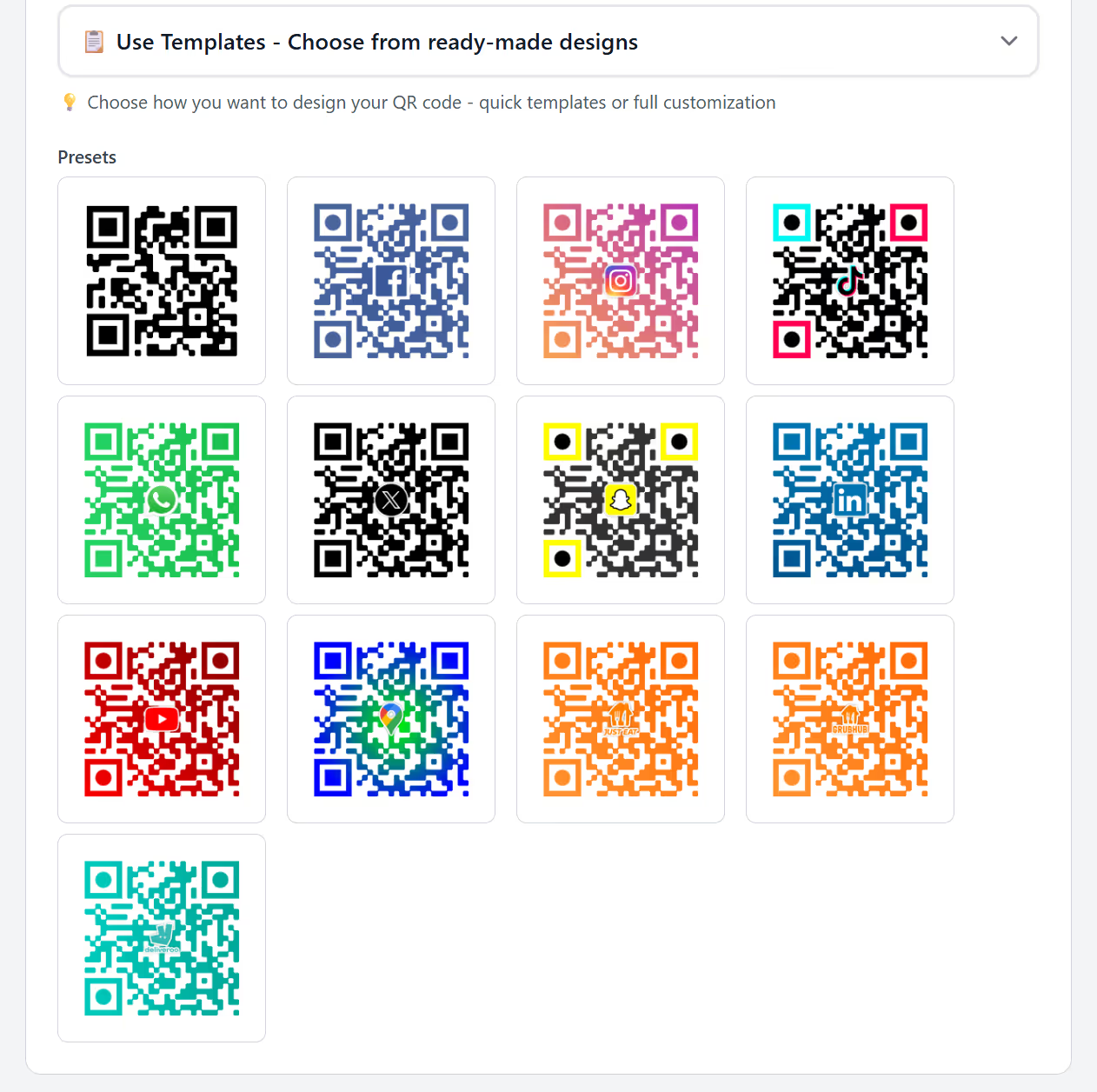
Twelve, plus a plain black preset with no icon. All 13 sit in the Use Templates panel on the Design step of a new QR code, available on Pro and Elite. The platform presets are:

  • Facebook
  • Instagram
  • TikTok
  • WhatsApp
  • X (Twitter)
  • Snapchat
  • LinkedIn
  • YouTube
  • Google Maps
  • Just Eat
  • Grubhub
  • Deliveroo
The Use Templates panel in the LinkShortener.io app with 13 QR code presets: plain black, Facebook, Instagram, TikTok, WhatsApp, X, Snapchat, LinkedIn, YouTube and Google Maps, then orange Just Eat and Grubhub codes and a teal Deliveroo code
The Use Templates panel on Pro and Elite. Clicking a preset applies its colours and centre icon to the code you are making; the plain black preset at top left carries no icon.

The presets do more than change the colour. TikTok's code is black with cyan and red corner squares, Snapchat's has yellow corner squares, and the Google Maps code shades from blue into green around its pin.

Just Eat and Grubhub share the same orange and near-identical centre icons, told apart only by a tiny wordmark, so on a small sticker it is worth printing "Order on Just Eat" beside the code. A preset's icon is always the platform's, never your own. To put your logo in the middle instead, see how to add a logo to a QR code, which starts on Basic.

What does a template change, and what stays the same?

A template changes the look of the code and nothing else. It sets the colours and the centre icon, while the name, the destination and the optional UTM tags go in exactly as they would for a plain code. Think of it as the quick route through the Design step; on Pro you can still set colours by hand when no preset fits.

Reach for a preset when the code leads to one of the 12 platforms that have one, Facebook and Deliveroo among them, and the colour has to say which app is about to open; the panel holding them is on Pro ($34 a month) and Elite. Hand-set colours start a plan earlier, on Basic ($13 a month), and they suit a code that opens your own site, where a TikTok palette would point at an app the scan never reaches.

Underneath, every code, template or not, opens a short link, and the QR code is stored with that link in your account. That means you can come back and download it again for a second print run, and on Pro or Elite you can change the link's destination while the printed codes stay exactly where they are.

Codes already printed from a template don't all behave the same if the account cancels or moves down to Basic or Free. One that opens a tli.sh link, the shared short domain, carries on scanning, although it can no longer be re-pointed and new codes can't use the presets. One that opens a link on your own custom domain depends on a paid plan: cancel or move to Free and that link stops redirecting, taking the printed code with it. For anything printed in large numbers, pick the domain with that in mind before the order goes in.

Which template fits a menu, a poster or a business card?

Pick the preset that matches where the scan lands, not where the code is printed. A table card that opens your Deliveroo listing suits the teal Deliveroo code, but the same card opening your own ordering page needs a plain or custom-coloured code, because a Deliveroo-styled code that lands somewhere else looks like a mistake to the person holding the phone.

The same rule sorts out the other common jobs. A Google Maps preset on a delivery box or leaflet belongs on your Maps listing, so the pin in the middle matches the screen that opens. A LinkedIn preset on a business card should open the profile itself; if that profile address still ends in a long run of letters and numbers, our LinkedIn URL shortener guide shows how to get a shorter one first.

A WhatsApp or Instagram preset on event signage tells guests which app is about to open before they scan. Sharing the same event in Instagram Stories or DMs as well? Give those their own short links instead of reusing the sign's, as our Instagram link shortener page explains, so the sign's scans and the taps on Instagram are counted separately. And for a code that shouldn't hint at any platform, make a plain one with the QR code generator.

How many QR code templates can I create?

There is no separate template limit. A code made from a preset counts towards your monthly allowance like any other link or QR code: 2,000 a month on Pro and 5,000 on Elite, and scans on those codes are never capped. Use the allowance up and nothing extra is charged; new codes wait for the next month unless you choose to upgrade.

Can I edit a pre-built QR design after I download it?

You can change where it goes, which is usually the part that matters. On Pro or Elite, edit the destination of the short link behind it and every printed copy sends people to the new page, with nothing to reprint. The look is a different matter: a new colour or icon only reaches people once the new artwork has been printed.

Is there a free QR code template?

No, the presets come with Pro and Elite only. A free account (no card) still makes plain QR codes, 20 links or QR codes a month in total, and those codes have no watermark on the pattern, just a small "created by linkshortener.io" line underneath that paid plans leave off. Basic, at $13 a month, is where you can choose the colours yourself; see the QR code styling options.
Before you pick a preset

QR code template questions: layout, scanning and file types

Is a QR code template a printable layout for a flyer or menu?

No. In LinkShortener.io a template styles the code itself, meaning its colours and the icon in the middle, and leaves the page around it to you. Download the finished code and place it in your own flyer, menu or table-card artwork. For words such as “Scan to order” printed around the code, turn on the Add Custom Border switch, which adds a frame with your own text on Basic ($13 a month) and above.

Does a template’s centre icon make the code harder to scan?

The icon hides some squares, but the code carries extra recovery data to make up for them. Twelve of the 13 presets put an icon over the middle of the pattern, and LinkShortener.io builds any code with a centre icon at error correction level H, the highest of the four levels in the QR standard (ISO/IEC 18004), where a plain code gets level M. Denso Wave’s guide to error correction explains that a higher level lets a code restore more of a dirty or damaged pattern, and it lists level M at 15%. Print one sample at its real size and scan it before a big run.

Which file types does a template QR code download as?

PNG and SVG, the same pair every LinkShortener.io code offers on every plan. Send the SVG to a printer, because a vector file stays sharp at any size, and use the PNG on a website, in an email or on a slide. There is no JPG or PDF download, so if a print shop asks for one, export it from your design software after placing the SVG.

Sign up today for free!

The 13 presets come with Pro at $34 a month. Want to try a plain code first? A free account with no card makes 20 links or QR codes a month and counts every scan.