A QR code generator with logo and stlying options has become essential tools for businesses, marketers, and individuals looking to share information quickly and effectively. With a single scan using a QR code scanner, QR codes direct users to websites, landing pages, social media profiles, and more, making them a powerful tool for engagement and mobile marketing. By using LinkShortener.io, you can create QR codes (or qrcode) tailored to your brand identity, helping you track engagement and achieve your goals effortlessly. Whether you need to generate QR codes for print materials, digital media, or mobile devices, LinkShortener.io offers a comprehensive QR code solution, including features like a qr generator and qr code generator free options.
A QR code (Quick Response code) is a two-dimensional barcode, also known as a qrcode, that can store data, such as URLs, contact details like vCard QR codes, WiFi QR codes, or social media links. When scanned with a smartphone or QR reader, it directs users to specific digital content. Modern QR codes can also include customized designs, like adding a logo on QR code or colors, making them a vital branding tool. A QR code generator with logo and styling options offered by LinkShortener.io, simplifies the process of creating these versatile qrcodes.
Several successful businesses have effectively used QR codes to boost engagement and achieve growth: Burberry integrated QR codes into their product tags and advertisements to offer exclusive augmented reality (AR) experiences, such as Instagram filters. This campaign increased online and in-store engagement, blending digital and physical customer interactions seamlessly.
Plastic Card ID
McDonald’s added QR codes to packaging and digital signage to offer customers interactive experiences, such as sweepstakes, nutritional information, and promotional games. This campaign boosted customer interaction and strengthened brand loyalty.
Email-Postman Limited
Had recently used our custom qr code generator to apply the founders face to the centre of the qr code. This went down very well at a e-commerce event. The custom qr code was well received that even tv show star Jason Bradbury was impressed, and tried out the qr code during the event.
Creating a custom QR code with LinkShortener.io is easy, offering features that offer you a power qr code generator and to become a truely awesome a qr creator tool. Here’s how you can generate QR code:
Step 1:
Sign Up or Log In
Visit LinkShortener.io and create an account, or log in if you’re an existing user.
Step 2:
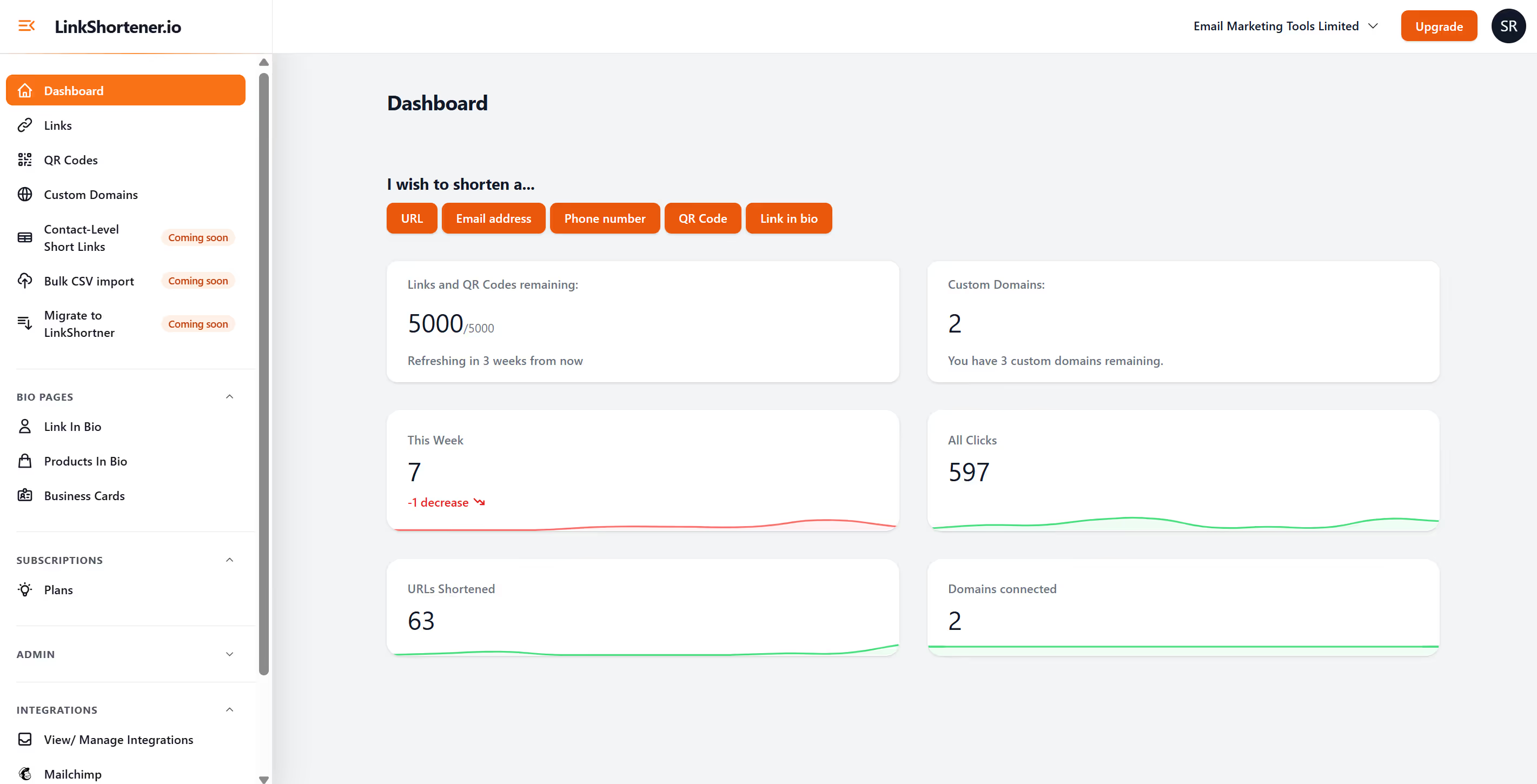
From the dashboard under the section “I wish to shorten a…” click on the orange button “QR code” or from the left hand menu click the QR Codes
Once logged in, navigate to the QR Code in your dashboard, this is your QR code generator and where the fun begins!
Step 3:
Start by adding a name for your QR code
This will not appear anywhere else other than in LinkShortener as a campaign folder name.
Step 4:
Select your QR code type, from “web link”, “email QR code” to “phone number”
You can generate a QR code from one of several QR code types. Most types are web links linking to a specific site, app store or app. You can also create text QR codes, URL QR codes, WiFi QR codes, and more.
Step 5:
Enter Your link destination
Input the link or digital content you want your QR code to direct users to. This could be a webpage, a social media profile, or even a product page to link to QR code.
Step 6:
Insert UTM tags
With LinkShortener.io generated qr codes, you can apply UTM tracked links to make sure your are reporting fully where the source, medium or content your links are attributing the traffic.
Step 7:
Customize Your QR Code (paid feature)
Tailor your QR code’s appearance with LinkShortener.io‘s customization options to create a QR code with logo. Add your logo, adjust the colors to match your branding, and choose a design that reflects your business identity. You can customize QR codes with different QR code shapes and QR code templates.
Step 8:
Generate and Download
Click “Create” orange button once your customization is complete. Download the QR code in the desired format (PNG or vector formats for high resolution QR codes and print quality), and you’re ready to implement it in your marketing materials.
Step 9:
Track Engagement
With LinkShortener.io‘s analytics dashboard, you can track how well your QR code is performing. Monitor the number of scans, geographic locations, and engagement trends over time to refine your strategies.
Ensure High Contrast:
Make sure there’s enough contrast between the background and the QR code to ensure easy scanning.
Place it Strategically:
Position QR codes in visible areas, such as product packaging, store windows, or event signage.
Test Before Launch:
Test your QR code across different devices to ensure it functions properly and has smartphone compatibility.
Use a Clear Call-to-Action:
Encourage users to scan your QR code with prompts like “Scan to learn more” or “Discover our latest offers here.”
Consider Error Correction:
Choose an appropriate error correction level to ensure.
LinkShortener.io offers more than just QR code generation—it provides powerful customization tools and analytics to help you track engagement and make data-driven decisions. Whether you’re using QR codes for marketing campaigns, event management, or customer engagement, LinkShortener.io ensures your QR codes stand out and perform effectively.