LinkShortener.io works as a Mailchimp link shortener in two ways. Connect your Mailchimp account and your sent email campaigns are pulled through, each ready to become a short link with one click. Or shorten any Mailchimp address yourself, a signup form for example, and count the clicks that short link gets.
Written by the LinkShortener.io team · Reviewed by Shaun Reynolds, Founder · Last reviewed September 2026
Quick answer
LinkShortener.io connects to Mailchimp and pulls in your sent campaigns, so each gets a trackable short link in one click. The connection works on the free plan: 20 links or QR codes a month in total, with every click counted. Short links on your own domain start with Basic at $13/mo, and LinkShortener.io is listed in Mailchimp’s integrations directory.
The short link opens the online version of the campaign, so people who never received the email, such as your social followers, can still read your latest newsletter.
It also leaves more room for your own words in a text message, where every character of a long web address counts against the limit.
Setup
How to connect Mailchimp to LinkShortener in 3 steps
Mailchimp is authorised in your dashboard, and a free account shortens a campaign you have already sent.
1
Create your free LinkShortener account
Sign up in under a minute, with no card needed. A free account is enough to shorten and measure your first few Mailchimp campaigns before you think about a plan.
2
Connect your Mailchimp account
Open Integrations in your LinkShortener dashboard and connect Mailchimp. There is no code to write and nothing to install in your Mailchimp account. Authorise the connection and LinkShortener pulls your sent campaigns through automatically.
3
Shorten a campaign link and track the clicks
Choose any campaign you have sent, and one click gives its online version a short link. Add UTM tags if you report in Google Analytics, then share the link on social, in SMS or anywhere character space is tight. Its report in your dashboard picks up new clicks each time you reload the page.
The integration is for the clicks that happen outside the email. Once a newsletter’s online version is posted on social media, sent in a text message or printed as a QR code, a LinkShortener.io short link counts the clicks and scans it gets.
Connecting Mailchimp to LinkShortener.io pays off for senders who give a newsletter a second outing. Posted to social, passed on as a text or printed behind a code, the campaign’s online version collects a count of its own on the short link, separate from what Mailchimp records inside the send, and the free plan’s 20 links or QR codes a month covers a weekly newsletter with a code alongside each one. A sender who never reshares a newsletter outside the email itself has nothing extra here to count.
Connect your Mailchimp account to LinkShortener in a few minutes, with no code to write.
Turn the online version of any sent newsletter into a short link without copying its address out of Mailchimp.
Share that short link on social media, in an SMS, or anywhere character space is tight, without pasting a long, untidy URL.
Track Mailchimp links with click analytics, so you know how a shared campaign performs after it leaves the inbox.
Add UTM tags to keep your reporting tidy inside Google Analytics and other tools.
Benefits of shortening your Mailchimp links
Branded short links on your own domain, from Basic at $13 a month, so every link reinforces your name rather than a generic shortener.
Unlimited clicks counted on every link you create, including the 20 links or QR codes a month (combined) on the free plan, so a campaign that takes off never hits a wall.
Email address and phone number short links on Pro ($34 a month) and Elite, for counting the readers who tap to email or call you from a campaign.
QR codes generated from the same dashboard, ideal for print, packaging, and event sign-ups that point back to your Mailchimp list.
Does the Mailchimp link shortener integration change my emails?
No. You shorten the links you choose and use them where you want, whether that is the shared online version of a newsletter or an individual link inside a campaign. Your Mailchimp templates and workflows stay exactly as they are.
Can I track Mailchimp links after someone shares them?
Yes. Because each short link records its own clicks, you can follow engagement wherever the link travels, including social posts and messages that never passed through the email.
Do I need a paid plan to connect Mailchimp?
No. The Mailchimp connection works on the free plan, and so do our ActiveCampaign and GetResponse integrations, though those two involve no connection: their short links are pasted into the emails by hand. You pay only for extras, such as your own domain in the link from Basic at $13 a month or changing where a link in a sent campaign points from Pro at $34 a month.
How do I shorten a Mailchimp signup form link?
Copy the web address of the signup form, the page people visit to subscribe, and paste it into LinkShortener.io as the destination of a new short link. Mailchimp’s guide to sharing a signup form puts that address behind a link icon in the System forms table, under Forms and then Forms settings.
You don’t need the integration for this. A Mailchimp signup-form URL is an ordinary web link, so it shortens like any other address, and every click on the short link is counted. The same guide says Mailchimp generates the address at random for each audience and it can’t be customised, whereas the short link in front of it can end in words you choose on Pro ($34 a month) or Elite, set when you create the link.
A café collecting newsletter sign-ups at the till and on its website could make two short links to the same form: one printed on a counter card as a QR code (every short link comes with one, with scans tracked), the other behind the website’s sign-up button. Subscribers still land in the Mailchimp audience as usual. The free report for each link then shows which route sends more people to the form: this week’s clicks, the total, clicks by country, desktop against mobile and the busiest hours (UTC) and days.
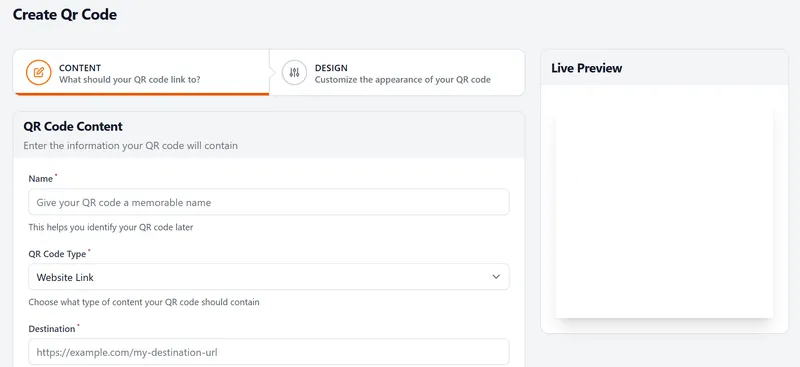
The Create QR Code screen in LinkShortener.io. For a Mailchimp signup form, choose Website Link and paste the form's address as the destination; the preview shows the code before you save it.
Do short links in sent Mailchimp campaigns keep working if I cancel?
Links on tli.sh do. A short link on the shared domain keeps redirecting and counting clicks after you cancel or move down to the free plan, so an old newsletter still does its job when someone digs it out of their inbox. Short links on your own custom domain behave differently: they stop working when the paid plan ends, including the copies already sitting in subscribers’ inboxes.
Whichever domain you choose, each link’s click history stays in your reports for as long as the account is open, free or paid, so this December’s newsletter can be set against last December’s.
Sign up today for free!
Try it on this month’s newsletter: connecting Mailchimp costs nothing on the free plan.
LinkShortener.io does the shortening in this pairing: you make the short links and QR codes here, then use them in Mailchimp emails, on landing pages or in print, and each one keeps its own click count on top of whatever Mailchimp reports for the email.
How do I use a link shortener with Mailchimp?
Create your short links in LinkShortener, then paste them into your Mailchimp campaign like any normal link. Your short link redirects to the destination while LinkShortener records every click on top of Mailchimp's own reporting.
Is the Mailchimp link shortener free?
Yes. LinkShortener.io works as a free Mailchimp URL shortener: a free account gives you 20 short links or QR codes a month combined, with unlimited click tracking and no card required, so you can start shortening links for your Mailchimp emails straight away.
Why use branded short links in Mailchimp emails?
A branded short link shows your own domain instead of tli.sh, the short domain free links share with other accounts, so readers see your name and the domain carries only your links. It is branding rather than a deliverability fix: where a campaign lands depends on far more than the domain in its links.
Can I track clicks across Mailchimp and other channels?
Yes. Because the link lives on LinkShortener, you get one combined view of every click, whether the link was opened from a Mailchimp email, a social post or a QR code on print.
Can I add a Mailchimp signup link to a link-in-bio page?
Yes, on Basic ($13 a month) and above, the plans that include bio pages. Put a button on your LinkShortener.io link-in-bio page that opens your Mailchimp signup form, and make its address a short link rather than the form’s own URL, because a tap on a bio-page button is counted only when it passes through one of your short links. That link’s report then shows how many profile visitors opened the form, separate from the clicks your campaigns bring in.
What happens when I hit the 20-link limit on the free plan?
The cap applies to creating new links, and it resets each month. The free allowance is 20 short links or QR codes combined, not 20 of each. Hitting it costs nothing and switches nothing off: there's no overage charge, links in campaigns you've already sent keep redirecting and counting clicks, and new links wait for next month unless you upgrade. To create more in the same month, Basic is $13 a month for 350 links or QR codes and Pro is $34 for 2,000. See pricing.
Can I change where a Mailchimp short link points after the campaign has been sent?
Yes, on Pro and Elite. Editing a link's destination after it has been shared is included with Pro at $34 a month, alongside 2,000 links or QR codes and 3 custom domains, and with Elite at $260 a month. That matters for email, because a sent campaign cannot be recalled. Instead, you edit the short link's destination and anyone clicking later lands on the corrected page. Basic at $13 a month does not include editing. See pricing.
Can I track clicks on mailto and phone number links inside a Mailchimp campaign?
Yes, on Pro at $34 a month and on Elite. Pro adds email-address and phone-number short links alongside 2,000 links or QR codes and 3 custom domains. A plain mailto or tel link records nothing, but shortened through LinkShortener.io it counts every click like any other link, so you can see how many people tap to email or call after reading a campaign. More on email address shortening.
Do I need my own domain to use branded short links in Mailchimp emails?
Yes, a branded short link runs on a domain you own, so you need one plus a plan that allows a custom domain: Basic at $13 a month includes 1 and 350 links or QR codes, Pro includes 3 and Elite 10. Without a domain of your own, Mailchimp short links made on the free plan use the shared tli.sh domain and count clicks just the same. See custom branded domains.