What does a URL shortener do for a small business website?
A URL shortener does two jobs for a business run by one or two people. It gets customers from paper to the right page: nobody types yourbusiness.co.uk/services/boiler-servicing-canterbury off a till receipt, but they will scan the code beside it. And it shows whether the leaflets, the van or last week’s Facebook post brought anyone in.
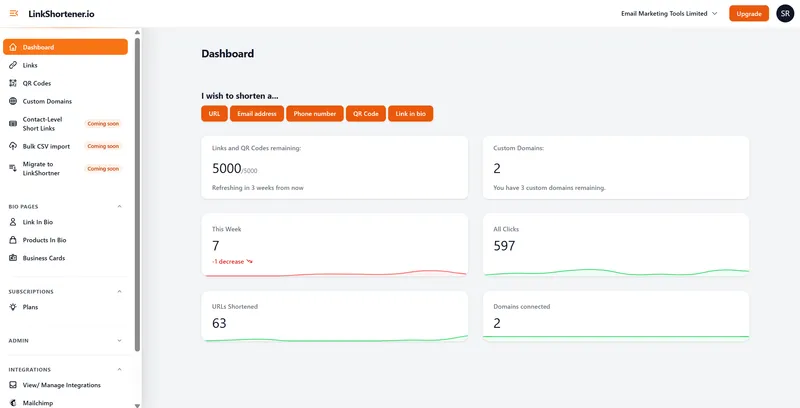
Nothing needs adding to your website: each short link keeps its own tally, with hits we recognise as bots or crawlers kept out.
The same account covers short links and QR codes on Free, and from Basic ($13 a month) it adds a link-in-bio page. Basic also puts short links on your own domain, while Pro ($34) adds short links that open a customer’s dialler or email app with your details in place. Every tap on those counts like a click, with no upper limit on any plan.
What should a business link shortener offer?
Four things: links on your own domain, a straight answer on who holds the click data, campaign tagging, and a way to re-point a link that is already in print. Here is where LinkShortener.io stands on each, including what it can’t do yet.
Can the links use our own domain?
Yes, once you pay for a plan. Basic ($13 a month) takes 1 branded domain such as go.yourbusiness.co.uk, Pro ($34) takes 3 and Elite ($260) takes 10.
One CNAME record points the domain at us, and HTTPS switches itself on once the domain is added, using a Let’s Encrypt certificate. The DNS step is covered in our guide to connecting a custom domain for short links. Free accounts stay on our shared tli.sh domain.
Who looks after the click data, and where is it kept?
Email Marketing Tools Limited runs the service: a UK company, registered in England and Wales (number 13556506) and on the Information Commissioner’s Office register under reference ZB421759. The app, the servers that answer your short links and the database holding the click records all run in London, UK.
If your business needs a data processing agreement, email hello@linkshortener.io and ask for one. Reports give you totals, never a list of individual visitors, and no visitor IP address appears in any report or export. Our privacy policy explains what is recorded when a customer clicks or scans.
Can we tag campaigns and see which ones convert?
Tagging, yes; conversions, no. UTM tags can go on short links on every plan, Free included, and a destination address that already carries a query string keeps it through the redirect, so your own analytics still sees the campaign name.
Our free campaign URL generator assembles the tags if you would rather not type them. LinkShortener.io counts clicks and scans, not sales or bookings, so judge which leaflet paid off from the tagged visits in your own analytics. From Pro, links on your own domain can also fire your Meta, Google, LinkedIn or TikTok pixel.
Can we change where a printed link or QR code goes?
On Pro ($34 a month) and Elite, yes: open the link, paste the new destination and save, as many times as you need. The address inside the code stays exactly as printed, so the menu, card or van carries on working and sends people to the new page. Those edits don’t use any of the month’s allowance. On Free and Basic a link keeps the destination it was created with, which is why we suggest, a little further down, aiming anything printed at a page on your own website.
Which plan fits your business?
Free, Basic, Pro or Elite: three questions decide which one you need.
- How many links and QR codes will you make each month? Up to 20, links and codes combined: Free. Up to 350: Basic at $13 a month. Up to 2,000: Pro at $34. Up to 5,000: Elite at $260. Beyond that, an Enterprise plan is quoted for your volume.
- Mostly online, or mostly on paper? Links in posts, emails and text messages are tapped rather than typed, so the generated endings on Free are no drawback there. Every plan makes QR codes for print; pick Basic when the code should carry your logo or the link your own domain, and Pro when a printed link needs a memorable ending or may need re-pointing later.
- Will staff share the account, or must it work with other tools? Teams start on Pro, and so does bulk CSV import, which you run yourself by uploading a CSV from your dashboard. Elite adds an account manager and free custom domain setup. Mailchimp connects inside the app on any plan, Free included. For ActiveCampaign and GetResponse, you paste your short links into the emails yourself. There is no public API.
Where this earns its keep is a business whose marketing is physical: a salon window, a market stall banner, a card through the door, with the same person printing it and reading the numbers on Monday. The finished code downloads as a PNG or an SVG file on every plan, the free one included, so print artwork comes straight out of the account. It is the wrong tool for running two versions of an offer behind one code, because a short link carries one destination, and the country and device rules on Pro and Elite are the only branches allowed on top of it.
Should a short link point at your website or straight at the booking app?
At your website, wherever you can. Make yourbusiness.co.uk/book the page with your booking button on it, and send the short link and QR code there. Change booking app next year and you edit that one web page; the sticker in the window and the cards already handed out still lead to that page, and the short link itself never needs touching.
Aim it at the booking app instead, and switching apps means re-pointing the short link, which only Pro ($34 a month) and Elite can do. Free links show no adverts on the way through and have no expiry date.
One catch for print: a link on our shared short domain keeps going if you cancel or return to Free, but one on your own domain, say go.yourbusiness.co.uk, lasts only while a paid plan covers it. Once you cancel, or your account goes back to Free, that link goes dead, and so does every window sticker, card or van QR code built on it.
How do I make a QR code from my Google review link?
Copy your Google review link, then create a QR code in LinkShortener.io with Website Link as the type and that address as the destination. The review link comes from Google Business Profile: select ‘Read reviews’, then ‘Get more reviews’, then Copy. On a free account it takes one of the month’s 20, and the report counts every scan. The menu names come from Google’s own review-link instructions, checked in September 2026.
Google’s link works by itself but won’t tell you how many people opened it. Make one code for the till card, one for your invoices and a short link for follow-up texts, and a month later you can see which prompt people act on and set it beside the reviews that came in.
The free version carries no watermark across the pattern; ‘created by linkshortener.io’ sits in small type beneath it and drops off once you pay for a plan and download the code again. Adding your shop’s logo to the centre of the code is a Basic feature ($13 a month).
Looking for a “shortcode” for text messages?
No, we don’t supply SMS short codes. Two different things get called that. An SMS short code, the short number (usually five digits in the UK) that customers text a keyword to, is rented through a text-message provider.
What we shorten is the web address inside the appointment reminders and offers you already send, which frees up characters and records each tap. The SMS short link guide works through the character count.