LinkShortener.io Help Centre
Choose a topic below for a straight answer about your account, links, QR codes or billing. Anything not covered can go to our team through the contact form, and if you’ve come across a short link that looks like spam or a scam, use the Report a link form.
Written by the LinkShortener.io team · Reviewed by Shaun Reynolds, Founder · Last reviewed September 2026
Quick answer
The LinkShortener.io help centre answers 13 questions, from opening a free account to what happens when you cancel. Signing up costs nothing and asks for no card, and the free plan’s 20 a month can go on short links, QR codes or a mix of both. Clicks and scans are tallied on every plan, however many there are.
Cancel, and anything you made on tli.sh keeps working, while short links on a domain of your own stop resolving.
- Paid plans: Basic $13 a month (350 links or QR codes, 1 custom domain), Pro $34 (2,000 links or codes, 3 domains), Elite $260 (5,000, 10 domains); yearly billing makes two months free.
- Allowance used up: nothing extra is billed; making more links waits for next month, or an upgrade. Clicks themselves are never charged for.
- Reported links: read by a person here within 2 hours on weekdays.
- Click history: kept while your account stays open.
Topics: Getting started · QR codes · Custom domains · Editing links · Clicks and scans · Plans and billing · Integrations · Email and phone links · Teams and Enterprise · Link safety · Not live yet · Can’t log in · Contact us
Every answer below assumes an account is already open and there is a job to finish: pointing a domain at LinkShortener.io, saving a QR code at print size, or reading a click report. That is who this page suits. Picking a plan is a different question, and the pricing page carries the full comparison, from 20 free links or QR codes a month to Basic at $13 a month with a domain of your own.
How do I set up a free account?
Click Try for free at the top of this page and register with your email. You won’t be asked for a card. Once you’re in, the dashboard’s I wish to shorten a… buttons start each new link, and the tile below them shows how many links and QR codes remain this month and says when the allowance refreshes.
The free allowance is 20 a month in total, and you can split it however you like between short links and QR codes. Free links use tli.sh, our shared short domain, with no adverts or holding pages in front of them, and they don’t expire on their own.
How do I create and download a QR code?
A QR code starts from the same dashboard. Choose QR Code there and give it a name, then keep the type as Website Link and enter the destination; the preview updates as you fill it in. Every plan, the free one included, can download it as a PNG or an SVG; the SVG is a vector file, so it prints at poster size without going soft.
Free-plan codes carry no watermark on the pattern itself; the one credit is a line of small print under the code reading ‘created by linkshortener.io’. Any paid plan drops that line, so download the code again once you’ve upgraded.
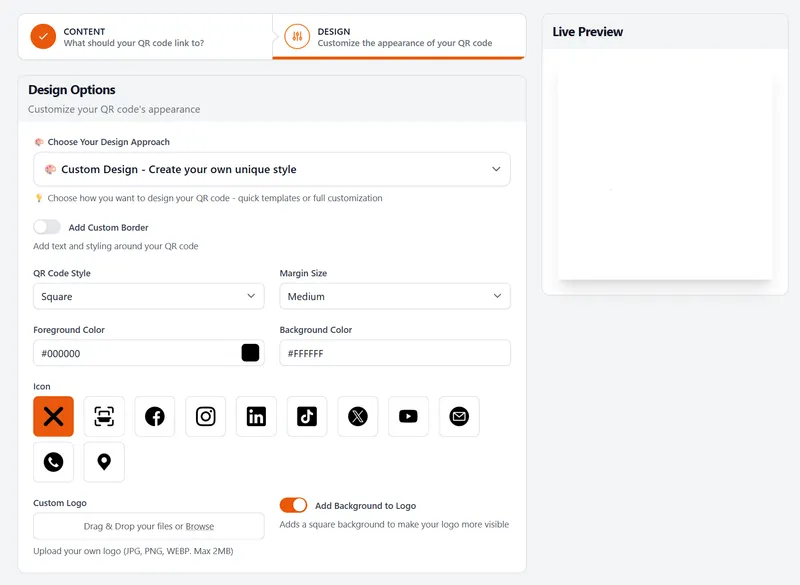
Your own logo, colours and the other design options come in from Basic ($13 a month), and the ready-made templates need Pro. If your plan includes a custom domain, you can pick it when creating the code, and the code then opens your branded link rather than a tli.sh one.
Before printing, size it with the 10:1 rule: the code should be at least a tenth as wide as the distance it’s scanned from. A code on a van door read from 4 metres away needs to be at least 40 cm across, and our QR size calculator does the sum for other distances.
How do I connect my own domain?
A custom branded domain needs a paid plan, starting with Basic at $13 a month; the free plan has none, and the table under Plans and billing shows how many each paid tier allows. To add yours (the custom domain setup guide goes into more detail):
- Open Custom Domains in the app’s left-hand menu and click New Custom Domain.
- Type a label (only you see it), then enter the domain or subdomain you’ll use, such as go.yourbrand.com.
- Add a CNAME record for it wherever your domain’s DNS is managed. Once the record matches, the domain shows as verified. Nothing needs doing about the padlock: we arrange HTTPS for the domain at our end once it is added.
Elite includes free custom domain setup. Already have branded links running on your own domain with Bitly or another service? Branded-link migration brings them across after a single change to your DNS zone; Basic, Pro and Elite include it, and the request starts from Migrate to LinkShortener in the app. Anything on bit.ly itself has to stay there.
Before you print anything that uses your own domain, read the note on cancelling in the plans section.
Which parts of a live link can I edit?
The destination, yes; the wording of the link itself, no. Editing the destination comes with Pro ($34 a month) and Elite: open the link, replace the URL in the Destination field and save, and every copy you’ve already printed or posted now leads to the new page. Free and Basic plans don’t have this option.
Custom endings (slugs), such as /summer-menu in place of a random code, are also a Pro and Elite feature, and you choose them as you create the link. They can’t be renamed afterwards, so check the spelling before it goes out.
Where do I see my clicks and scans?
The dashboard’s This Week and All Clicks tiles give you the headline numbers. Nothing caps the click and scan count, on Free or on any paid plan.
Even on a free account the click report splits your clicks by country and into desktop versus mobile, then charts which UTC hours and which days draw the most clicks.
Bots and crawlers that we recognise are screened out, so they don’t inflate the figures. Old clicks don’t age out either. On free and paid plans the history is there until the account is closed, rather than being trimmed after a fixed period. Reloading the report pulls in any clicks processed since you opened it.
What do the plans cost, and what if I cancel?
The free plan costs nothing and the listed paid plans run from $13 to $260 a month; pay yearly and you get two months free. The table sticks to the headline numbers. Link-in-bio pages and digital business cards start on Basic, self-serve bulk CSV import comes with Pro and Elite, and the pricing page lists the rest.
| Plan | Price a month | Short links or QR codes a month | Custom domains |
|---|---|---|---|
| Free | $0 | 20 | None |
| Basic | $13 | 350 | 1 |
| Pro | $34 | 2,000 | 3 |
| Elite | $260 | 5,000 | 10 |
Using up your monthly allowance switches nothing off, and it costs you nothing extra: none of the plans has overage fees, and clicks never add to the bill, whatever the traffic. Existing links and codes keep redirecting and counting; new ones wait until the allowance refreshes next month, unless you choose to upgrade from inside the app.
You can cancel or move back to the free plan from your own dashboard, whenever you like, and the monthly plans have no minimum contract. Afterwards, your tli.sh links and QR codes are unaffected: they keep redirecting, and the clicks already recorded stay in your reports.
Short links on your custom domain are different: they stop resolving, and so does any QR code made from one of them, since custom domains belong to the paid plans. Before you cancel, then, list every link and code that uses your own domain and arrange replacements for any still printed, posted or in regular use.
Which email marketing tools does it work with?
Mailchimp, GetResponse and ActiveCampaign are the three live integrations, and a free account can use every one of them. Mailchimp is the only one you connect to your LinkShortener.io account, and once connected it syncs the campaigns you’ve sent. GetResponse and ActiveCampaign each list us in their own integration directory and work by copy and paste: take a short link out of your account and paste it into the email or text you’re writing in that tool. There’s no Constant Contact or MailerLite integration, but a LinkShortener.io short link pasted into one of their emails by hand still has its clicks counted in your report.
How do email and phone short links work?
An email link starts a new message to your address in whatever mail app the visitor uses, and a phone link brings up the call screen with your number entered. To make one, pick Email address or Phone number in the dashboard’s I wish to shorten a… row; both link types come with Pro ($34 a month) and Elite.
Because they’re short links, every tap is counted. WhatsApp links aren’t available yet.
Can I set up a team, and what’s on Enterprise?
Teams come with Pro ($34 a month) and Elite. Contact-level links, which give each person on your list their own short link so a click can be traced back to that contact, are available to Enterprise customers only.
Enterprise also brings single sign-on (SSO), white-label options and priority support. It’s priced on request, and you apply through the form on the Enterprise plan page.
How do I report a suspicious short link?
Use the Report a link form. It asks for the short link, a reason such as spam, phishing or malware, and, if you’d like an update, your email address. On a weekday, no report sits for more than 2 hours before one of us has read it, and the investigation begins there and then.
A report matters because a scan can only judge a destination as it stood when the scan ran. Ours run when a link is created, again about 2 hours later, and after any edit to its main destination. A link whose destination fails while being saved is not accepted, and after that a member of our team can switch off any link found breaking our terms of use. What no scan catches is the page that behaves itself until the day it doesn’t, and that is why a report from someone who has just clicked one counts for so much.
What isn’t available yet?
Three things people ask for are not built yet: a public API, WhatsApp links and a Zapier connection. There is no public API, and WhatsApp links and a Zapier connection are coming soon, with no date set. Password-protected links and tracking pixels, once on this list, are now part of Pro, Elite and Enterprise.
I can’t log in. How do I get help?
Being locked out doesn’t cut you off from us: the contact form and the hello@linkshortener.io inbox both work without logging in. The sign-in page itself is app.linkshortener.io/auth/login, in case you have landed somewhere else. Give us the email address the account was opened with; that’s how the team finds it. If all you want is to flag a suspicious short link, the Report a link form needs no account at all.
How do I contact the LinkShortener.io team?
Use the contact form to write to us, and include your account email and the short link you’re asking about, if there is one; it saves a round of back-and-forth. General questions, such as how link-in-bio pages work, are covered in the FAQs.
Reviews from customers are on our Trustpilot page, where LinkShortener.io has a TrustScore of 4.0 (rated Great) from 3 reviews, as of September 2026.
Email Marketing Tools Limited (Companies House no. 13556506) runs LinkShortener.io from Herne Bay in Kent; the registered office is 153 Mortimer Street, Herne Bay, Kent, CT6 5HA.
Sign up today for free!
Short links, QR codes and their click reports all work on a free account opened without a card, and you can make 20 links or codes a month. The steps above are easiest to follow with the app open in another tab.