URL Shortener: Custom Branded Links with Click Tracking
A URL shortener swaps your long web address for a shorter link; this one can put that link on your own domain at $13 a month.
From $13/month, LinkShortener.io puts your short links on a custom branded domain you own, such as go.yourbrand.com/spring, and on every plan, free included, it counts every click they get. The free report already splits clicks by country, desktop versus mobile and the busiest hours and days, with no cap on how many are counted; from Pro ($34/month) you can also change where a link goes after you have shared it, without changing the link.
A short link is only as good as the page behind it. We look at where each link leads when you make it, when someone uses it, and every night, and tell you which ones have stopped loading, so a printed card or an old post never sends someone nowhere.
Broken link foundgo.yourbrand.com/autumn returned 404. Fix it in your dashboard.
Example links, for illustration.
Written by the LinkShortener.io team · Reviewed by Shaun Reynolds, Founder · Last reviewed November 2026
Quick answer
A URL shortener points a short link at a long web address; a custom URL shortener puts that link on your own branded domain, such as go.yourbrand.com/spring. LinkShortener.io connects one on Basic at $13/month; Pro ($34/month) adds your own link endings and destination editing. Free accounts get 20 links or QR codes a month, combined, on the shared tli.sh domain, and every plan counts each click with no cap.
New to this? How to shorten a URL has the steps; the custom-domain part is below.
What is a URL shortener, and what makes one custom?
A URL shortener is an online service that files a long web address under a much shorter one and, whenever somebody opens the short version, sends them on to the page it stands for with an HTTP redirect (a 301 or a 302).
Also called a custom link shortener, a custom URL shortener puts your own domain in front of every short link, so people see go.yourbrand.com/sale rather than the tli.sh address that free LinkShortener.io links carry. We use the temporary kind of redirect, a 302, so each click passes through us on its way and lands in the report.
A generic shortener gives you a random string on its own domain; a custom or branded URL shortener gives you go.yourbrand.com/spring, with your name on every link and a full click record behind it.
LinkShortener.io does three things with a short link. It puts the link on your custom branded domain (from $13/month), it counts every click in a click report on every plan including free, and on Pro and above it lets you edit the destination after sharing, so a link you have printed or posted keeps working when the page behind it moves. Any link can also be turned into a QR code from the same dashboard.
How does a URL shortener work, from tap to page?
A URL shortener saves your long address under a short code, and each time that code is opened it looks the code up and tells the browser where to go instead. Ours answers with a 302 rather than a 301. A browser can remember a 301 and skip the redirect server on its next visit, but a 302 counts as temporary, so each visit comes back to be counted and follows a destination changed on Pro or Elite, even for someone who opened the link last week.
Between a tap on go.yourbrand.com/spring and the page appearing, the redirect server works through four steps:
It matches the code. The server takes the domain the link was opened on together with the code after the slash and finds the saved link for that pair. The code is either a short string of letters and numbers we generate or, on Pro and Elite, a word you type such as spring; because the domain is part of the match, your /spring can never be confused with the same word on someone else’s domain.
It settles the destination. A Pro or Elite link can also hold rules by country or by device type; a visitor who fits one is sent to that rule’s page, someone who matches both kinds of rule is sent where the country rule says, and anyone who fits none goes to the main destination. UTM tags saved with the link are joined onto the address at this stage.
It logs the click. The visit is logged against the link, and your report files it under the hour (UTC) and day it came in, its country, and desktop or mobile. Known bots and crawlers are screened out before anything is added up, and so are requests that arrive without a user agent string, which every standard browser sends.
It sends the browser on. The 302 response carries the full destination, which the browser loads at once, with nothing of ours shown on the way. A code that matches no active link gets a 404 page instead of a redirect.
What is a URL shortener good for?
Room comes first: a text message, a social post or a printed flyer has little space, and an address full of tracking tags is hard to retype. A short address also reads cleanly where a string of codes does not, and on your own domain name (from $13 a month) it carries your brand. The third reason is the count: each tap lands in a click report showing how many came, from which countries and on desktop or mobile. That record matters well after launch week, as the click study in the next section shows.
What does one campaign link involve on the free plan, from set-up to report?
Picture a community theatre selling seats for its winter pantomime through the December newsletter and a poster in the high street library. The booking page sits at https://tickets.example.org/whats-on/winter-2026/cinderella-pantomime/book, far too long to print and untidy in an email. This is the job on a free account.
Start with the booking address and its tags. Put the full booking address into the destination field, then fill in source (newsletter), medium (email) and campaign (panto-2026), so the theatre’s own Google Analytics groups every visit from this link under the pantomime campaign.
Create the link and copy it. It comes back on tli.sh with an ending we generate, ready to sit behind the newsletter’s Book now button. Choosing the words after the slash yourself begins on Pro.
Give the poster a link of its own. Repeat the first two steps with the source set to library and the medium to print, then download that second link’s matching QR code: SVG for the print shop, PNG for anywhere on screen, and Free has both. Two links keep the library scans apart from the newsletter clicks. A free code carries a small LinkShortener.io credit line printed beneath it, off the code itself, and paid plans leave the line out.
Read the report a month on. Each link’s report shows this week’s count beside the lifetime count, the countries clicks came from, how they divide between mobile and desktop, and which hours (UTC) and weekdays peak. Resist judging the newsletter on the night it goes out. Our click study counted 2,056,596 clicks, from the first one logged on 18 July 2023 to the day of the count, 21 September 2026, with known bots and crawlers kept out: 27.9% of them came one to seven days after the link was made, and 31.1% eight to thirty days after.
On Basic, at $13/month, both links would begin with go.example.org instead of tli.sh, still with endings we generate, and the poster’s code would print without the credit line; the tags and the report work exactly as above.
How do you set up a custom link shortener?
Three steps, split between our dashboard and whoever manages your DNS:
Choose Basic or above. Basic is $13 a month and covers 1 custom domain; Pro ($34) covers 3 and Elite ($260) covers 10.
Add one CNAME record. Enter the domain in the dashboard, then create a single CNAME record for it at your DNS provider. HTTPS comes on by itself with a Let’s Encrypt certificate, so there is no certificate to buy or install. Elite plans include free custom domain setup.
Make links on it. Paste a long address and pick your domain. On Pro and Elite you can also type the back-half, the words after the slash such as /sale. It is fixed the moment the link is saved and cannot be renamed later, so settle the wording before anything is printed.
Whether a subdomain or a separate short domain should carry your links, and how many domains several brands need, is covered in our guide to picking and connecting a branded domain. The Custom Domains screen, and what happens to links on your domain if you cancel, are covered further down this page.
What does a branded short link tell the person clicking?
A branded short link answers two questions at once: who sent it (the domain) and where it goes (the slug). Before anyone clicks a link they read it, and a link on a shared shortening domain answers neither question, which is why some email filters, messaging apps and cautious readers treat generic short links with suspicion.
Readability matters as much as trust. go.yourbrand.com/spring can be read out on a podcast, typed from a poster and remembered from a slide. A long address full of tracking parameters cannot. Short links do not change how Google ranks your pages; what they change is whether a person chooses to follow them.
What do you need to put links on your own domain?
A domain you control and any paid plan, because custom domains aren’t part of Free. It doesn’t have to be a new short domain: a subdomain of your existing site, such as go.yourbrand.com or links.yourbrand.co.uk, works and leaves the main site alone.
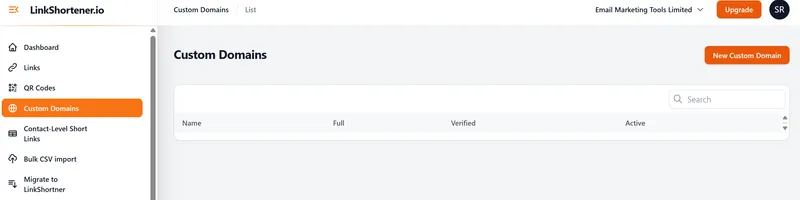
Add it under Custom Domains › New Custom Domain, then create a CNAME record for it with your registrar or DNS host; the custom branded domains page covers what changes about your links once it is live. When your CNAME is picked up, the domain shows as Verified and Active on the Custom Domains screen (pictured), and HTTPS is set up for it automatically. A QR code you create on a paid plan can then use that domain as well, so the code carries your branded link.
The Custom Domains screen before a domain is added: each connected domain gets Verified and Active columns, and New Custom Domain adds one.
Check one rule before you print anything. The domain only answers while the account is on Basic or above; cancel or move to Free and every link on it, and every QR code printed with one of them, stops working. Links and QR codes on our shared short domain carry on either way, so a code for long-life packaging is safer there unless you plan to keep paying.
How do you pick a short domain for branded links?
Keep the name to a few letters people can spell. Anyone copying a link off a van, a slide or a till receipt types every character, so cut the brand name to an abbreviation your customers already recognise, and leave out hyphens and lookalike pairs such as l and 1 or O and 0.
Choose the extension for length and audience. The letters after the dot are typed as well: .uk costs three characters where .co.uk costs six, and a country ending tells a home audience where you trade. Whichever you register, turn on automatic renewal, because a lapsed domain switches off every short link and printed code that uses it.
Point it at us with a CNAME record. Once the domain is added in the dashboard, one CNAME record is all our set-up asks for, made wherever the domain’s DNS is managed, which is not always the company that sold you the name. Put that record on a subdomain, with go. or link. in front of the name, because DNS does not let a CNAME sit on a bare domain such as yourbrand.co.uk: that name already carries the records that keep the domain and its email running. Ask us before planning links on the bare name itself.
What you get
What does a custom URL shortener do?
⚡
From long URL to go.yourbrand.com
Paste the long address and the short link comes back ready to copy. On Pro and Elite you type the ending yourself, so go.yourbrand.com/spring reads the way you wrote it instead of as a random code.
🌐
Custom branded domains
Connect go.yourbrand.com on any paid plan and every short link carries your name, not ours. Free accounts stay on our shared domain.
📈
Campaign tags set at creation
Tags travel with the link rather than the domain, so a click on go.yourbrand.com/spring still files under the campaign you named in the destination site’s Google Analytics. Free plan as well.
📦
Poster, packing slip, inbox
Give the poster, the packing slip and the email footer a link each on your own domain, then read the three reports side by side to see which surface people actually used. Mailchimp connects directly, on free accounts too. With GetResponse or ActiveCampaign, you paste the link into the email footer by hand.
Click tracking
What does click tracking show you?
Every click and scan is counted on every plan, with no monthly limit. The first four cards below are what the analytics report shows, on Free and on every paid plan alike.
📈
Total clicks per link
How many clicks each short link and QR code has had this week, and in total, on every plan.
🌎
Clicks by country
See which countries your clicks come from, on the free plan too, so you know whether a campaign reached the market it was aimed at.
📱
Clicks by device
Desktop versus mobile for each link, on every plan, which tells you whether the page behind it needs to work on a phone first.
🕑
Clicks by day and hour
The most popular hours (in UTC) and days show when people actually click, so you can time the next send or post to match.
⏱️
Every click counted
The page does not refresh itself: reload it after an email goes out and any clicks processed since your last look join the totals.
🏷️
UTM attribution
Links carry your UTM tags into Google Analytics, so short-link clicks are credited to the right source, medium and campaign.
🤖
Bots out, history kept
Known bots and crawlers are left out of the numbers, and your click history stays in the account until you close it, free or paid.
🔗
Editable destinations (Pro)
On Pro and above, change where a short link points after it has been shared. The link you printed or posted stays exactly the same.
Everything needed to shorten and measure a link is on the free plan: the short link, its QR code, UTM tags and a click report with no ceiling on the count. The limit is volume: a combined total of 20 links or QR codes each month. What paying adds is control over the link itself. Basic ($13/month) puts your domain in front of the slash, and Pro ($34/month) lets you write the words after it and repoint a link once it is out. Each paid plan also lifts the monthly allowance, which Basic takes to 350, Pro to 2,000 and Elite to 5,000, and no plan charges for the clicks themselves.
Paid plans bring other additions too, among them a logo on your QR codes from Basic and, from Pro, rules that send visitors to a different page by country or device. Safety is not one of the upgrades: the malware and phishing checks, made when a link is created and repeated about 2 hours later, cover free links exactly as they cover paid ones.
Free tier and starting paid price
LinkShortener.io as a custom URL shortener. Prices and volumes are from our pricing page, 2 November 2026; the other rows are how the product behaves today.
Free tier features
20 links or QR codes a month, combined, on our shared domain, every click and scan counted. The free report: this week’s clicks, total clicks, countries, desktop or mobile, and the busiest hours (UTC) and days. UTM tags included; free account, no card.
Starting paid price
$13/month on Basic, which includes 1 custom domain and 350 links or QR codes a month. Pay yearly and you are charged for ten months, not twelve.
Custom domain support
None on Free. 1 domain on Basic, 3 on Pro ($34/month), 10 on Elite ($260/month), each pointed at us with a CNAME record and given HTTPS automatically.
What Pro and Elite add
Pro ($34/month): 2,000 links or QR codes a month, your own link endings, the Create teams option and bulk CSV import. Elite ($260/month): 5,000 a month, 10 custom domains and a dedicated account manager.
Changing a destination
Pro and up. A Free or Basic link keeps pointing at the address you first gave it.
Click history
Kept for as long as the account stays open, on the free plan as well.
Bitly keeps branded domains for its $29/month Growth plan, billed annually, and allows 5 links plus 2 QR codes a month on free, but ours start at $13/month and the free allowance is 20 in any mix. TinyURL records no clicks at all on free and keeps two years of history on its $9/month Pro plan, but every plan here counts every click and holds the history while the account is open (both checked 2 November 2026). Rebrandly’s free plan shows detailed analytics for 100 clicks a month, checked 2 November 2026, where our free report counts every click however many there are.
Which features does a business need from a URL shortener?
Three features come up most often when a business compares shorteners: your own domain on every link, changing where a link goes after it has been printed or sent, and UTM tags. The domain comes with Basic at $13 a month. Changing the destination is on Pro at $34 a month and on Elite. The same two plans run a broken link checker that tests a new link within a minute, again whenever someone uses it, and every night, and lists any whose page no longer loads, so you know which destination needs changing.
UTM tags, so each click is filed under the right source and campaign in your analytics, are on every plan, Free included. Our page on a link shortener for small businesses follows a one-van plumber from free review QR codes on invoices to a branded address lettered on the van.
Weighing it up: a branded shortener fits an organisation that already owns a domain and shares links where the address is read before it is tapped, on packaging, a printed price list, a council letter, a newsletter footer, and Basic allows 350 links or QR codes a month for that kind of use. Two things rule it out. You cannot shorten a single address here without signing in, because an account is needed even for the free 20 a month, and reporting that has to cover conversions or split tests is not on any plan: a link holds one destination plus optional country and device rules, with no conversion tracking and no A/B testing.
How does LinkShortener.io answer the usual comparison questions?
The table answers four questions, one to a row: whether you can pick your own link ending, whether you have to sign up, what the service is best for, and where it runs.
How does LinkShortener.io answer the usual comparison questions?
Question
LinkShortener.io
Can I pick my own link ending?
Yes, on Pro and Elite. You type the ending while creating the link and it stays fixed after that; Free and Basic links get a generated code.
Do I have to sign up?
Yes. The account is free, asks for no card, and is where your links, tags and click reports are kept.
What is it best for?
Short links you can track, each with a matching QR code, on a branded domain from $13 a month.
Hosted or self-hosted?
Hosted, in London, UK, with redirects answered by a separate server from the dashboard.
Because the service is hosted, there is no server or script for you to run or patch: HTTPS on your domain, malware and phishing checks on the main destination of every link, and the click reports are all handled on our side.
Good to know
Custom URL shortener FAQs
What is a URL shortener?
Any URL shortener, LinkShortener.io included, is an online tool that gives a long web address a short stand-in and forwards anyone who opens the stand-in to the original page. The free LinkShortener.io plan hosts those stand-ins on tli.sh, gives each one a click report, and allows 20 a month in total, QR codes counted in that figure. Swapping tli.sh for your own domain on new links needs the Basic plan, $13/month for one domain.
How can I shorten a URL?
Log in to LinkShortener.io, put the long address in the destination box, press Shorten and copy the new tli.sh address from the result. The account is required but free, with no card asked for, and it keeps the link, its tags and its click report for later. Fill in UTM tags in the same form before saving if you want your own analytics to group the visits by campaign. Each new link takes one of the free plan’s 20 a month, a total that QR codes share, and our five-step shortening guide covers doing it on a phone or in bulk.
How can I make my URL shorter?
Give it a short stand-in instead of cutting it down. The path in a long address tells the website which page to serve, so deleting part of it breaks the link, and the tracking tags after the question mark are what your analytics reads. A shortener leaves the original untouched and hands out a new address made of a domain and a brief code, which on the free plan means tli.sh followed by a few generated characters. Paid plans make that address easier to read rather than shorter: Basic ($13/month) swaps tli.sh for a domain of your own, and Pro ($34/month) swaps the generated code for a word you choose, such as /menu.
Does ‘custom’ mean my own domain or my own link ending?
It can mean either, and they sit on different plans. The domain is the part in front of the slash: connect one as a custom branded domain and every link reads go.yourbrand.com instead of a shared address, from Basic at $13/month, which includes one domain. The ending after the slash is the other half: choosing it yourself, a vanity URL such as /spring, starts on Pro at $34/month. Endings are fixed as the link is created and can’t be renamed later, so on Free and Basic you keep the short code we generate.
Why do I need an account to shorten a URL?
An account is what keeps your links saved and tracked. Every short link you create sits in your dashboard with its UTM tags and click report, on every plan including free, and on Pro and above you can also change where it points. The free account gives you 20 links or QR codes a month, combined, and does not ask for a card.
How do I create a custom branded short link?
Sign in to your free account, paste the long URL and save; the short link is ready to copy straight away. To put links on your own domain, point a subdomain such as go.yourbrand.com at us with a CNAME record at your DNS host; once the Custom Domains screen marks it Verified, new short links can use it, and HTTPS is switched on for it with no extra step. The domain itself needs Basic at $13/month, and picking the ending after the slash needs Pro at $34/month.
Can short links run on my own domain, and what happens if I cancel?
Yes, on any paid plan, and every short link then carries your name instead of ours. You get 1 custom domain on Basic ($13/month), 3 on Pro ($34/month) and 10 on Elite ($260/month); the free plan uses our shared short domain. If you cancel or move down to Free, links on that domain stop resolving; the ones on our shared domain keep redirecting.
Can I change where a short link goes after sharing it?
Yes, from the Pro plan ($34/month) up. Open the link in your dashboard and change its destination; the short link itself stays exactly the same, so anything already printed, posted or emailed keeps working. More on editing a short link after creation.
Is a custom URL shortener free?
Shortening costs nothing: 20 links or QR codes a month, combined, with every click counted in the free report and no card needed. Using your own domain is a paid feature, from $13/month on the Basic plan.
What happens when I have used the month’s links?
Nothing is switched off and nothing extra is charged. The links and QR codes you have already made carry on redirecting and carry on counting clicks, the ones on your own domain included, and clicks are never billed on any plan. The allowance limits how many new links you make, never the traffic they go on to get. New links wait for next month, or you move up a plan: 350 a month on Basic, 2,000 on Pro, 5,000 on Elite.
Can I track clicks on a shortened URL?
Yes, on every plan and with no cap. Open any link and the free report gives its clicks this week and since it was made, the countries they came from, whether people opened it on desktop or mobile, and the hours (UTC) and days when it gets clicked most; upgrading to a paid plan leaves that analytics report unchanged. We leave known bots and crawlers out of the count, and the history stays until you close your account.
Do shortened URLs expire?
No. Links on our shared short domain don’t expire and never show ads, free ones included, and they keep working if you cancel or downgrade. Links on your own custom domain work for as long as you stay on a paid plan. The number of clicks a link gets makes no difference: one that nobody opens stays live. We do not close free accounts that sit idle or remove their links, and a tli.sh ending that has been used is never reissued to another account, so an address already in print cannot start sending people to a stranger’s page.
Is it legal to shorten a URL, and are short links safe?
Yes, shortening a link is legal; what matters is where it points. A short link hides its destination, so some people are wary of them. We check new LinkShortener.io links and QR codes for malware and phishing at the point they are created, then once more about 2 hours later, and refuse any link whose destination fails that first check. Those checks look at the main address a link sends people to, and they run again if that address is changed. Report a suspicious short link on our abuse report form: on weekdays someone here opens the report within two hours and starts looking into it.
Is it safe to click a LinkShortener.io link?
Yes. A LinkShortener.io link sends you through a single 302 redirect straight to the page its owner chose, with no advert, preview screen or countdown in between, and we never add affiliate codes, extra tracking or third-party redirects on the way. Its destination was screened for malware and phishing when the link was made and screened once more about 2 hours later, and a link that breaks our terms of use is blocked, so it no longer forwards anyone. The owner’s report shows totals only, such as clicks by country and desktop or mobile, never your IP address or browser details.
Does Google still have its own URL shortener?
No. Google stopped creating goo.gl links in 2019, and those left idle in late 2024 stopped redirecting after 25 August 2025; links still in use were kept but can never be edited. Inside Google Forms, ticking Shorten URL gives a shorter link to that one form and to no other page. Those dates come from Google’s developer notice, checked 14 September 2026, and our page on replacing old goo.gl links explains how to find the ones you still rely on and recreate them.
What’s the best URL shortener?
The best one is whichever has limits that match how you share links, so compare four things before the brand: the free monthly allowance, whether clicks stop being counted past a cap, how long click history is kept, and what a link on your own domain costs. Dub’s free plan, for instance, keeps 30 days of analytics history (read on Dub’s own pricing page on 2 November 2026), while every LinkShortener.io plan keeps a link’s clicks until the account is closed. Our six-way URL shortener comparison lists each provider’s figures with the date they were read; we make LinkShortener.io, so judge it on those numbers rather than on where we placed ourselves.
Can my existing custom domain and its links come across from another shortener?
Yes, if the links sit on a domain you own. Links made on a rival’s own short domain can’t come with you, because that domain isn’t yours to repoint. For your own domain, our sales team handles the move and you change one DNS zone record; the links already out there keep redirecting. Details: migrating to LinkShortener.io.
Sign up today for free!
Start free with 20 links or QR codes a month on our shared domain, then add your own domain from $13/month.