NEWBroken Link Checker, on Pro and Elite: we check your short links and QR codes every day and flag any that break.See how it works →Broken Link Checker is here →
Home › UTM Builder

Free UTM builder

Build campaign URLs with UTM tags in your browser, free and with no signup.

Written by the LinkShortener.io team · Reviewed by Shaun Reynolds, Founder · Last reviewed September 2026

Quick answer

The LinkShortener.io UTM builder tags any web address with up to five UTM parameters for free, writing the campaign URL as you type. It runs in your browser with no signup and stores nothing. To shorten the tagged URL or turn it into a QR code, a free account (no card) covers 20 links or QR codes a month, combined.

  • Source, medium and campaign go on every link; utm_term and utm_content are optional.
  • Free reports count every click and scan with no cap and show this week’s clicks, total clicks, the countries they came from, the desktop-versus-mobile split and the peak hours (UTC) and days, leaving out known bots and crawlers.
Your campaign URL appears here as you type…

Fill in the boxes and the tagged URL builds itself in the dashed box, ready to copy. Leave off https:// and the builder adds it; if the address already has a question mark in it, the tags join on with & so the parameters already there keep working. Tagging one address at a time is what this builder does: an email button, a Facebook post, a leaflet going to print, with no account, no card and nothing kept once the tab is closed. A product feed of hundreds of addresses belongs in a spreadsheet formula instead, and tags that may have to be rewritten once the link is out need that address behind a short link on Pro ($34 a month), the first plan that lets a destination be changed after it is shared.

Take any #section off the end of the address first. The builder adds the tags after it, and anything after a # never reaches the website’s server, so those tags can go missing from your reports.

What are UTM parameters?

UTM parameters are short tags added to the end of a URL that tell your analytics where a visitor came from. When someone clicks a tagged link, tools like Google Analytics read the tags and credit the right source, channel and campaign, instead of lumping everything into “direct”.

Which UTM parameters do you need?

Source, medium and campaign belong on every link you tag. Any box you leave empty stays out of the URL altogether, so utm_term and utm_content only need filling in when you have a paid keyword or a variant to record.

Which UTM parameters do you need?
TagAnswersExample
utm_sourceWhere from?newsletter, instagram, google
utm_mediumWhat kind of channel?email, social, cpc, print
utm_campaignWhich push?spring-sale-2026
utm_termWhich paid keyword? (optional)link-shortener
utm_contentWhich variant? (optional)header-button vs footer-link

Three habits that keep your data clean

Stick to lowercase. Analytics tools treat Email and email as different mediums, which splits your reports. Agree names once. One shared list of sources and mediums beats everyone inventing their own.

Use dashes, not spaces. Spaces turn into %20 and make URLs harder to read, and a plus sign is no better, because the builder encodes it as %2B.

The catch: tagged URLs are long and ugly

A properly tagged URL easily passes 120 characters. That is fine behind an email button but awkward in a bio, a text message or on paper. For those, copy what the builder wrote and paste it into the Destination field of a new link in our free short link generator (a free account, no card), then share the short link instead.

Whoever taps it lands on the address you built, with its utm_ tags intact. If you would rather type the values into the app itself, UTM tagging in the app does that from the plain address; use one route or the other for each link.

On the free plan, every tagged short link you make takes one of 20 monthly slots. If a campaign with lots of utm_content variants uses them up, the next link waits until the allowance resets or you move to a paid plan. If the link should carry your name, your own branded domain comes with the Basic plan and up, from $13 a month.
Should a printed QR code hold the tagged URL?

Better not. A code holding a whole tagged address needs far more squares than one holding a short link, so each square prints smaller. Build the address here, then paste it into a QR code made in the app, as with this spring sale leaflet.

  1. Settle the tags. Website URL https://www.example.co.uk/spring-sale, source leaflet, medium print, campaign spring-sale-2026, content door-drop. Out comes a 125-character address: https://www.example.co.uk/spring-sale?utm_source=leaflet&utm_medium=print&utm_campaign=spring-sale-2026&utm_content=door-drop
  2. See what printing it raw would do. The code would need almost twice as many squares across, 49 × 49 for the 125-character address against 25 × 25 for a short link of up to 26 characters (QR versions 8 and 2, at the medium error-correction level). On a code 3 cm wide, not counting the quiet zone, each square is 0.61 mm instead of 1.2 mm, and bigger squares are easier for a phone camera to read from further away.
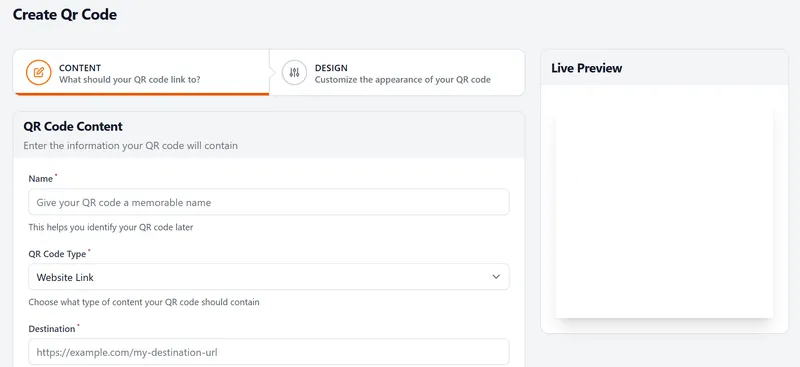
  3. Paste it into a new QR code. In the app, start a new QR code and paste the whole 125-character address into its Destination field. The code on the leaflet holds a short link, not the 125 characters, and every scan still opens the spring sale page with all four tags in place.
  4. Size it. Check the width against the scanning distance with the QR code size calculator before the leaflets go to print.
LinkShortener.io Create QR Code form with a Name field, QR Code Type set to Website Link, a Destination field and a Live Preview panel
The Create QR Code form from step 3, where the tagged address goes into the Destination field beside the name, the QR code type and a live preview of the code.

Give each placement its own utm_content (door-drop, shop-counter) and its own code; in the builder each shows up as a unique URL, and on the free plan each code counts towards your 20 a month. Codes from a free account have ‘created by linkshortener.io’ in small letters below them, so leave space under the leaflet’s code in the artwork.

Frequently asked questions

Do UTM tags affect SEO?

Not when used normally. Google treats them as tracking, and a correct canonical tag on the page prevents duplicate-content issues. Use them for campaigns, not internal links on your own site.

Are UTM tags case-sensitive?

Yes, most analytics tools count Email and email separately. Pick lowercase and stick to it.

What's the difference between source and medium?

Source is the specific place (newsletter, instagram); medium is the type of channel (email, social). “instagram / social” and “newsletter / email” are typical pairs.

Does this tool store my URLs?

No. It runs entirely in your browser, so nothing you type is sent or saved anywhere.

Why is there no box for utm_id?

The builder sticks to the five tags most reports rely on. Google Analytics also reads utm_id, a campaign ID, and Google suggests using the same IDs you use when you upload campaign data. If you do that, add &utm_id= and your ID to the end of the URL once you have copied it.

Why doesn't my short link's click count match Google Analytics?

They count different moments. We count the click or scan on the short link, leaving out known bots and crawlers. Google Analytics records a visit only after your page loads and its tag runs, so someone who leaves early or declines analytics cookies can appear in our count but not in Google Analytics.

Can I change the UTM tags on a short link after sharing it?

From Pro ($34/month), yes. If you use LinkShortener.io as a UTM link shortener, tags pasted in from this builder become part of the short link’s destination, so editing that destination swaps the old tags for new ones while the short link, and any QR code already printed from it, stays the same. Those edits don’t use up the monthly allowance. Free and Basic plans can’t change a saved link’s destination, so different tags there mean making another short link.

Sign up today for free!

Put your campaign tags on short links and QR codes, then compare their clicks and scans.