LinkShortener.io has three email marketing integrations: Mailchimp, which you connect inside the dashboard, plus ActiveCampaign and GetResponse, whose emails take the short links you paste in. A free account covers all three.
Written by the LinkShortener.io team · Reviewed by Shaun Reynolds, Founder · Last reviewed September 2026
Quick answer
LinkShortener.io has three live integrations: Mailchimp, ActiveCampaign and GetResponse, and all three can be used on the free plan, which needs an account but no card and comes with a monthly allowance of 20 links or QR codes. Only Mailchimp is linked to your account; ActiveCampaign and GetResponse are copy and paste, with each short link made in the dashboard and dropped into your message. Connect Mailchimp and your sent campaigns are listed in a table, so any campaign's online version becomes a short link in one click. We have no public API, though a Zapier connection is coming soon. Constant Contact and MailerLite are not integrated, although a short link created in the dashboard can go into their emails too, with every click counted.
Why connect Mailchimp to LinkShortener.io?
It saves the copy-and-paste step between sending a campaign and sharing it anywhere else. With the Mailchimp link shortener connected, your sent campaigns appear as a table in your LinkShortener dashboard, and one click turns a campaign's online version into a short link for a social post or an SMS, where a long archive address would waste characters. The ActiveCampaign integration and the GetResponse integration each have their own page explaining how they work.
Take one newsletter as an example. Your monthly update goes out from Mailchimp on a Tuesday morning, and you want to post it on LinkedIn and mention it in a text to regular customers. Pick the campaign from the table, create the short link and use that same link in both places. The free report then counts the clicks this week and in total, breaks them down by country and into desktop and mobile, and lists the hours (UTC) and days that bring the most clicks, which is handy when you choose the day and time for next month's send. If the address you shorten already carries tracking tags, such as utm_source=newsletter, they reach the destination page unchanged, so your analytics tool still sees them.
How do I connect LinkShortener to my tools?
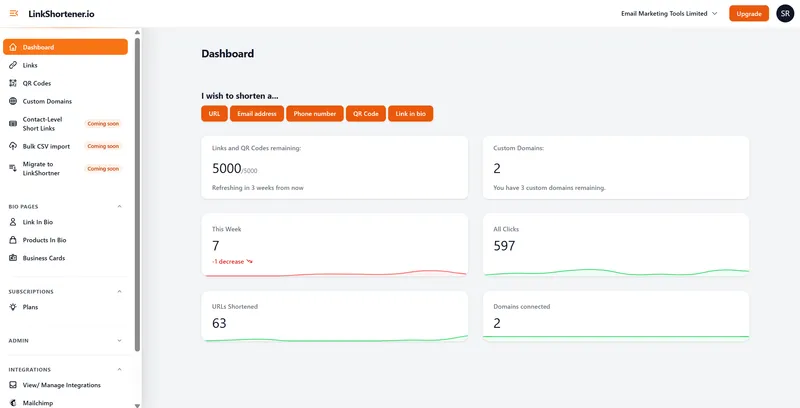
Create a free LinkShortener account (no card needed), then open View/ Manage Integrations in the Integrations section of the dashboard's left-hand menu and follow the steps for Mailchimp. ActiveCampaign and GetResponse have nothing to set up there: shorten the address in the dashboard and paste the short link into your email or text.
The Integrations section is in the dashboard's left-hand menu, with View/ Manage Integrations and Mailchimp listed under it. For a platform with no direct integration, links start from the 'I wish to shorten a...' buttons at the top.
Will connecting affect my email marketing setup?
No. The Mailchimp integration reads your sent campaigns so you can create short links from them. Your templates, automations and lists stay exactly as they are.
Is there a cost to use integrations?
No. All three integrations work on the free plan. On that plan you get 20 links or QR codes per month, counted together, and clicks on them are counted with no cap. If a busy month uses up the allowance, new links wait for next month or for an upgrade; nothing is charged as overage, and the links already sitting in sent emails keep redirecting.
Which short domain should links in my emails use?
On the free plan, short links use the shared tli.sh domain. From Basic at $13 a month you can add a domain of your own (Basic includes one, Pro three and Elite ten), so the links in your newsletters carry your brand name. A domain won't decide inbox placement by itself: no domain, shared or your own, can promise how a spam filter treats a message. What your own domain does give you is an address that only ever carries your links. Custom branded domains covers the setup.
Plan changes matter more for email links than for social posts, because people click links in old emails months after they were sent. Links on tli.sh carry on redirecting after a cancellation or a move to the free plan. Short links on your own domain don't: they stop working once you cancel or go down to Free, so an archived newsletter that uses them would lead nowhere.
Can I connect other tools through an API or Zapier?
No public API is offered, and a Zapier connection is coming soon. Until it arrives, Mailchimp is the only direct connection, and every other short link, including those you paste into ActiveCampaign or GetResponse, is made in the dashboard one at a time on any plan. Pro and Elite can also turn a whole CSV file into short links: download the template from Bulk CSV import on the dashboard, add one destination per row and upload it, up to 200 rows a file.
What if my email platform isn't one of the three?
You can still put short links in its emails; you create them in the dashboard rather than picking campaigns from a table. Paste the short link into your email like any other web address and every click on it is counted in LinkShortener. That is how it works for Constant Contact and MailerLite, which LinkShortener does not integrate with. On Pro and Elite you can also shorten an email address or phone number, so the email-us and call-us links in a campaign record clicks too; shortening email addresses shows how.