Link In Bio
A link in bio page is a single links page that all your social profiles point to, with a button for your shop, your latest video, your newsletter or anything else. It’s perfect for influencers, small businesses and content creators.
Written by the LinkShortener.io team · Reviewed by Shaun Reynolds, Founder · Last reviewed September 2026
Quick answer
A link in bio page is a mobile web page you add to your Instagram, TikTok or YouTube profile, so one link takes followers to your shop, videos, newsletter or donation page. Bio pages on LinkShortener.io need Basic at $13 a month, not the free plan, and a button whose address is a short link has its taps counted.
One link, for everyone.
Influencers & Creators
Share recent collaborations, blog posts and affiliate links in one place. Keep every project organised.
Small Businesses
Promote products, services and exclusive offers, and direct customers to your store. Your account also includes our link shortener for small businesses, for the QR codes on flyers and in the shop window.
Non-Profits
Raise awareness for campaigns, provide donation links and share educational materials.
Musicians & Podcasters
Promote tours, albums and new episodes, with tickets, streaming and merch available through a single link.
Everything in one place.
Website Links
Drive traffic to your blog, store or product pages.
Social Profiles
Make it easy to connect with you across Instagram, Facebook and X.
Exclusive Offers
Highlight special discounts, launches and limited-time offers.
Affiliate Links
Organise your affiliate partnerships to generate more income.
Videos & Podcasts
Keep your audience engaged with your latest content.
Email & Phone Links
Let people email or call you in one tap, powered by our email address and phone number shorteners. From Pro at $34 a month.
How do I make a link in bio page people actually tap?
Name each button after what the follower gets, the way Bright & Co. writes ‘Shop the spring drop’ rather than just ‘Shop’, and keep the list short enough to read on a phone without scrolling.
On YouTube, put your bio page’s link first in your channel’s list of links: YouTube shows the first one near the Subscribe button and keeps the rest behind a click (source: YouTube Help on managing your channel’s profile).
Selling products or handing out contact details instead? Look at our product in bio pages and digital business cards, which come with the same plans.
The case for a bio page is one profile slot that has to point at several destinations at once, which is why building one starts at Basic, $13 a month, rather than on the free plan. Where every post drives to the same shop or the same sign-up form, the page is one more tap between the follower and the thing they came for, and a short link dropped straight into the profile field does that work with its taps counted.
What does that look like in practice?
Suppose Bright & Co., the page in the phone above, only has shops in the UK and gives each button a short link from the same account.
- Find your nearest store: the click report for its short link splits the taps by country. If many come from abroad, the store finder is no use to those followers, so keep the spring-drop button on top.
- Watch our latest: compare this button’s taps in a week with no new video against the week one goes up. If the count barely moves, the newsletter could have that second slot instead.
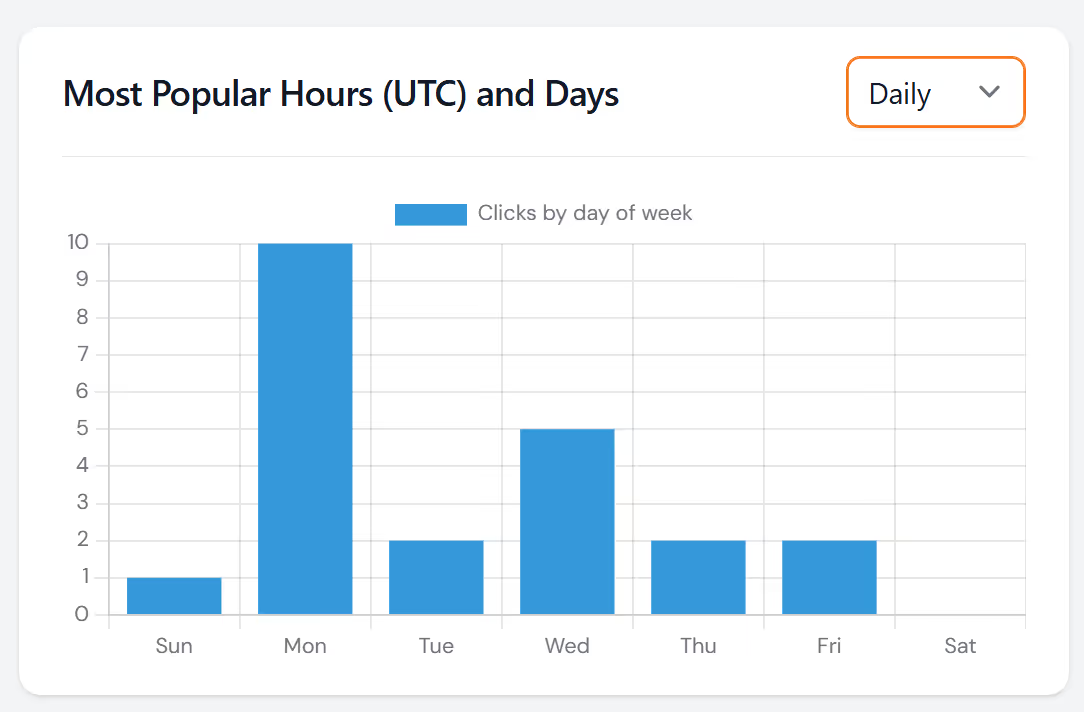
For a single post, such as a YouTube video description or an Instagram Story, a short link does the tracking without a page: see our YouTube link shortener and Instagram link shortener guides. Still on Linktree for now? The Linktree link shortener guide covers counting taps on its buttons.
Sign up today for free!
Open a free account and track the links you already post, without entering card details, then build your bio page once you upgrade to Basic ($13 a month).
Questions about this page
How can I track clicks on my Link in Bio page?
Create a LinkShortener.io short link for every button and enter it as the URL of that button. Its report then counts the taps on that button. The Bright & Co. example on this page shows how those counts can settle the order of the buttons.
Which plan includes link in bio pages?
Link in bio pages are included on the Basic plan at $13 a month and above. You cannot build a bio page on the free plan. What a free account does give you is room for 20 short links or QR codes a month; clicks on those links are counted without a cap.
Who should use Link in Bio pages?
Link in Bio pages are useful for creators, small businesses, and larger brands that want a single page to share products, content, and important links from social media profiles.
Can I put my link-in-bio page behind my own branded domain?
Not at the moment: a custom domain carries your short links and QR codes only. Custom branded domains are a paid-plan feature: Basic at $13 a month includes 1, Pro at $34 a month includes 3, and Elite at $260 a month includes 10. The free plan does not include one. All three paid tiers also include the LinkShortener.io link-in-bio page builder, and the full allowances are on the pricing page. Our custom branded link shortener serves that domain only while a paid plan is active: cancel or move to Free and every short link on it stops redirecting, along with any QR code that opens one.
Can I change where a link on my bio page points after I have shared it?
Yes, on Pro and Elite. Editing a link destination after it has been shared is included on Pro at $34 a month and Elite at $260 a month, but not on Basic at $13 a month or the free plan. That means a sold-out product or a finished campaign can be repointed on LinkShortener.io without reposting your bio link or reprinting anything.
Is there a limit on how many clicks I can see on my link-in-bio page?
No. The click count on each of its short links has no ceiling, whatever your plan, and older clicks stay on record until the account is closed. The report for each one puts the count so far this week next to the running total, sorts the clicks by country and by device type (mobile or desktop), and shows the hour (UTC) and the day of the week when most arrive.
Can I add a tap-to-email or tap-to-call button to my link-in-bio page?
Yes, on Pro. One-tap email and phone links are powered by email-address and phone-number short links, which are included on Pro at $34 a month and above, not on Basic at $13 a month. The email address shortener handles the email side, and every tap is tracked on LinkShortener.io like any other click.
Is there a discount for paying for a link-in-bio plan yearly?
Yes. Annual billing gives you two months free, so Basic is $130 a year rather than $156, Pro is $340 a year rather than $408, and Elite is $2,600 a year. The two-months-free saving applies to every paid LinkShortener.io plan, whichever monthly link allowance you need.