NEWBroken Link Checker, on Pro and Elite: we check your short links and QR codes every day and flag any that break.See how it works →Broken Link Checker is here →
Home › Use Cases › Print & Packaging

Short Links & QR Codes for Print and Packaging

Print is permanent; web pages are not. On Pro and Elite, the short link or QR code on the pack can be re-pointed when the page behind it moves, so the artwork never has to change.

Written by the LinkShortener.io team · Reviewed by Shaun Reynolds, Founder · Last reviewed September 2026

Quick answer

For QR codes on product packaging, use a URL shortener and print a short link inside the code, not the long product address. LinkShortener.io makes the link and its code together and counts every scan on every plan: a 10,000-box run is tracked in full even on a free account (20 links or QR codes a month, combined).

No card is needed, and the free account can download the code as a PNG or an SVG file for the printer. A free code has no watermark across its squares but prints with a small “created by linkshortener.io” credit beneath it; Basic at $13/month removes the credit from codes downloaded after upgrading. Re-pointing a code already on shelves needs Pro at $34/month or Elite.

Why should a pack’s QR code hold a short link, not the product URL?

Because the shorter the address inside a QR code, the fewer and bigger its squares. At error-correction level M, a 29-character short link such as https://go.yourbrand.com/care fits a 29 × 29 grid, while a 120-character product address carrying a variant ID and tracking tags needs 45 × 45. Printed 2 cm wide, each square shrinks from 0.69 mm to 0.44 mm.

Grid sizes checked by our team with the open-source Python qrcode encoder (September 2026); square sizes are for a 2 cm code, quiet zone excluded.
What the code holdsCharactersGrid at level MGrid at level H (logo codes)Square at 2 cm, level MSquare at 2 cm, level H
Short link (https://go.yourbrand.com/care)2929 × 2933 × 330.69 mm0.61 mm
Product address with a variant ID and UTM tags12045 × 4561 × 610.44 mm0.33 mm

Bigger squares survive what printing and handling do to a code: ink spreading into uncoated board, the curve of a bottle, glare off a gloss laminate.

The long address, tags and all, moves behind the short link, where its length costs nothing: UTM tags such as utm_medium=packaging on the destination reach your analytics unchanged after the redirect and add no squares to the print.

Which printed pieces need a QR code, and which a typed link?

Most need both: the code for phones, and the short link beside it for anyone whose camera won’t focus. What differs is the reading distance.

  • Boxes, sleeves and labels are read in the hand at 15 to 20 cm, where a 2 cm code is enough; link them to care instructions, manuals, warranty registration or a reorder page.
  • A product with a companion app needs only one printed code: with a Pro ($34/month) or Elite ($260/month) plan, a device rule sends phone and tablet scans to your app’s download page, which shows both the App Store and Google Play badges, while anyone typing the short link on a computer gets the main destination, such as the full product site.
  • Give each flyer version or mailing its own short link, so visits from each are counted separately.
  • Posters and outdoor sites are scanned from metres away; size them with the viewing distance and size chart and give each site its own code.
  • Business cards can carry the short link of a digital business card (from Basic, $13/month). That business card’s own QR code holds a vCard, a snapshot of your details on the day it was made, while its web link always shows the current ones.

What are the steps from short link to printed pack?

Five steps, in this order, because once the run is printed only the page behind the code can change, never the code itself.

  • Create the short link first. On Pro ($34/month) or Elite you choose the ending, such as /pan-care, and it can’t be renamed later; Free and Basic links get a short automatic ending.
  • Style the QR code with dark squares on a light ground, and keep the quiet zone clear of folds, glue flaps, seams and the barcode. Colours and a logo come with Basic ($13/month) and above.
  • Check the size for the viewing distance using the QR size calculator. A label is scanned at 15 cm, a poster at 2 m, a billboard at 20 m.
  • Test-scan a proof before the print run. Scan the printed proof, not the PDF on screen, with two different phones in the lighting where the pack will be used.
  • Update the destination whenever you need: on Pro or Elite the print stays the same and only the page behind it changes. Watch scans per code in the dashboard.

Our QR designer switches a code to error-correction level H by itself once a logo or centre icon is added. Level H can restore up to 30% of a code’s data (Denso Wave’s error-correction table), so the grid grows: 33 × 33 instead of 29 × 29 for the short link above. For logo QR codes, the Custom Logo box accepts JPG, PNG and WEBP files no bigger than 2 MB; if the logo gets lost among the code’s squares, switch on Add Background to Logo so the logo sits on a plain square of its own inside the code.
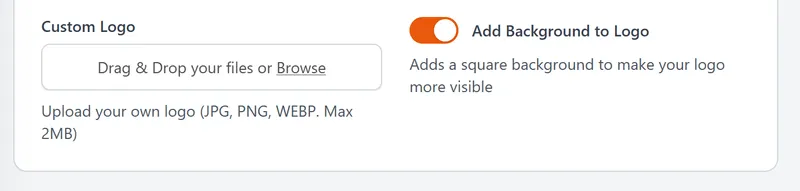
QR code designer Custom Logo box taking JPG, PNG or WEBP files up to 2 MB, with the Add Background to Logo switch
The Custom Logo step for a pack code. Logo upload is a paid feature, from Basic at $13/mo.

One frying-pan sleeve, three countries

A cookware brand on Pro ($34/month) prints go.yourbrand.com/pan-care on the sleeve of a 28 cm frying pan, with a 2 cm QR code on the flat back panel. The same sleeve ships to the UK, Ireland and Germany.

  • The link’s main destination is the English care and warranty page. Anyone who matches no rule lands there, so Irish scans need no rule of their own.
  • One country rule sends scans from Germany to the German care page.
  • Eighteen months later the brand moves its care pages to a new website. The main destination is edited and the German rule is replaced with one pointing at the new German page; every sleeve already in a kitchen drawer follows, and not one sleeve goes back to the printer.

Does a pack code still work years after launch?

Yes. A code on our shared short domain keeps redirecting with no end date, and scan history is kept while the account stays open, so a scan from a pan bought three years after launch lands in the same report as launch week. Even on Free, the report breaks those scans down by country, compares desktop with mobile, and picks out the most popular hours (UTC) and days of the week.

On Free or Basic the destination can’t be changed, so point pack codes at a page built to last, such as a permanent care page rather than a launch offer. Codes on your own domain are a separate case, covered in the downgrade answer below.

Which print runs justify a paid plan? Ones whose artwork will outlive the page behind it: a product manual, a care label still being scanned three years after launch, a sign screwed to a reception wall. Pro ($34/month) carries the destination edit, and there is no limit on how many times a printed code is re-pointed, with those edits taking nothing from the monthly allowance. A leaflet for one Saturday market, with nothing left to move afterwards, can stay on Free.

If the range is large, or sells online too

Our guide to making a custom QR code explains static versus dynamic codes and file formats. For a whole range, bulk CSV imports are part of Pro ($34/month) as well as Elite ($260/month): upload the spreadsheet of product pages from your dashboard and it becomes one short link per SKU, each with its own click report and each counted in that month’s allowance. If the same products also sell online, short links for online stores picks up where this page stops.

Before the run

The small print on pack codes

Can I change the web page after the packaging is printed?

Yes, on Pro ($34/month) or Elite ($260/month). The printed pattern holds the short link, never the page behind it, so one edit re-points every pack already on shelves. On Free and Basic the destination is fixed when the code is made (compare plans and pricing). An edit can’t rescue the print itself: a code that is too small or too faint still has to be reprinted, so test-scan the proof first.

How small can a QR code be on a label?

A code holding a short link works at 2 cm square on a label read from 15 cm, provided the contrast is strong and there is clear space around it. A long address or a centre logo shrinks each square at that size (0.44 mm instead of 0.69 mm for a 120-character address at level M), so shorten the address before you print.

Can a pack code be printed in one colour, or reversed out of a dark pack?

One colour is fine if it is dark on a light ground, such as navy on white board. Pale squares on a dark pack are a different matter: plenty of phone cameras read them, but not every scanner app does, so check the printed proof with more than one phone. Choosing the code’s colours in the QR designer needs Basic ($13/month) or above.

Can the code sit on a curved bottle or can?

Yes, if the whole code faces the camera at once. Keep it narrow compared with the container, so the edges don’t wrap out of view, place it on the flattest part of the label, and test-scan a printed sample on the real bottle, not a flat proof.

Can the QR code sit beside the barcode?

Yes, with a clear gap between them. Keep the EAN barcode too: a short-link QR code carries no product number (unlike a GS1 Digital Link code, which is built around one), so a till can’t price the item from it. A few words such as ‘Scan for care tips’ tell shoppers the QR code is for their phone.

Can the pack code carry recycling or safety information?

Yes, as extra detail: point the short link at a page with recycling instructions, safety notes or full ingredients, and update that page when the rules change. Anything the law requires on the label itself, such as allergens on prepacked food, still has to be printed on the pack.

Do I need a separate QR code for every item in a print run?

No. One QR code covers the whole run, whether that is 500 flyers or 50,000 boxes, because plan limits count the codes you create each month, not the scans they receive, and no plan charges for scans. Use separate codes only where you want to compare placements, such as one per flyer version.

Can the printed short link use my own brand name instead of a generic domain?

Yes, but decide before the artwork is final: the domain is part of the printed pattern, so a code made on our shared domain keeps that domain for good. Basic ($13/month) includes one custom domain, which you pick when you create the code; Pro includes three and Elite ten. See custom branded domains.

What happens to my printed QR codes if I downgrade or cancel my plan?

Codes and short links on our shared short domain keep working after you downgrade or cancel. A pack printed with your own domain is different: short links on a custom domain stop working when you cancel or drop to Free, and any QR code that encodes one stops with them, so keep a paid plan that covers that domain for as long as the pack is on shelves. Dropping below Pro also removes editing a link destination, so settle where each code points before you downgrade.

Sign up today for free!

Make your first pack code, print it on a real proof and scan it with two phones before anyone signs off the run.