Quick answer
To shorten a link on iPhone or Android, copy the long URL, open the link shortener at LinkShortener.io in Safari or Chrome, paste the URL in, tap Shorten, then copy the short link and paste it anywhere. It is the same 6 steps on both phones, with nothing to install. It runs in your mobile browser with a free account, which covers 20 short links or QR codes a month combined at $0, with unlimited click tracking and no card details. The whole job takes under a minute.
You don't need to install anything to shorten a link on your phone. Copy the long link, open LinkShortener.io's free short link generator in your phone's browser and sign in, paste the link in, create the short version, then copy it back and paste it wherever it needs to go. That's the entire job, and it takes under a minute on any iPhone or Android phone. The short link you make works everywhere: texts, group chats, social bios, emails and printed materials alike.
Below are the tap-by-tap steps for both platforms, what to watch for in links copied from an app's Share button, how to put the tool on your home screen and where to find the taps once your link is out. On a computer, the same job is laid out in our four-step guide to shortening a link URL.
How to shorten a link on iPhone
- Copy the long link. If the page is open in Safari, tap and hold the address bar, then tap Copy. If the link is sitting in another app (an email, a note, a message), press and hold the link itself and choose Copy from the menu that appears.
- Open LinkShortener.io in Safari and log in. Visit it as you would any other site; the first time, create a free account instead, which asks for no card. It works in any mobile browser, so there is nothing to download first.
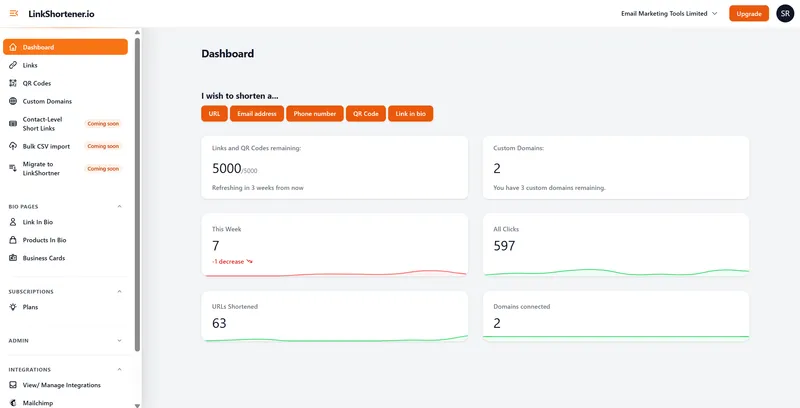
- Paste the long link into the tool. On the dashboard, tap URL under “I wish to shorten a…”. Tap the destination box, tap and hold until Paste appears, then tap it. Your long URL drops straight in.
- Create the short link. Tap the button to shorten it and you'll get a tidy link a fraction of the length of the original.
- Tap-copy the short link. Tap to copy the new link so it's on your clipboard, replacing the long one.
- Paste it anywhere. Press and hold in any text field, whether that's Messages, WhatsApp, your Instagram bio or an email, and tap Paste.
How to shorten a URL on Android
- Copy the long link. In Chrome, tap the address bar, long-press the URL and choose Copy, or tap the Share icon and choose Copy link. In any other app, long-press the link and pick the copy option from the menu.
- Open LinkShortener.io and log in. Use Chrome or another browser you like. No account yet? Sign up there and then, just as on iPhone.
- Paste the long URL. Pick URL on the dashboard, long-press the destination field and tap Paste.
- Shorten it. Tap the button to create your short link.
- Copy the short link. Tap to copy the new link to your clipboard.
- Share it wherever you like. Long-press and paste into a text, a bio, a listing or a group chat.
Notice the flow is identical to the iPhone version. Because the tool lives on the web rather than in an app store, the steps don't change with the phone in your hand. Your account doesn't change either.
Can you add a link shortener to your home screen?
Yes. Safari and Chrome can both pin a website to your home screen as an icon, so if you shorten links often, the tool is one tap away:
- On iPhone: open the shortener in Safari, tap the Share button, then choose Add to Home Screen and tap Add. If Add to Home Screen is missing, Apple’s iPhone User Guide shows how to add it with Edit Actions at the bottom of the list.
- On Android: open the site in Chrome, tap the menu, then choose Add to Home screen. Where the menu offers Install and create shortcut instead, tap it, then Create shortcut and Add, as Google’s Chrome help for Android sets out.
The icon opens straight to LinkShortener.io. It behaves much like an app, without the storage or the updates.
What goes wrong when you paste a long link on a phone?
A long link sprawls. An address full of parameters wraps across several lines of a text message and can look broken, or suspicious, and in a bio it eats space you would rather give to words. A short link sits on one line and looks deliberate.
Links copied with an app's Share button often carry extras on the end, too. YouTube's Share button, for one, adds a code beginning ?si= to the video address. A LinkShortener.io link passes the whole address along, query string included, so the page opens exactly as the long link would have opened it.
That is what you want when the tags on the end are your own UTM tags. If you would rather not pass YouTube's share code on, delete the ?si= part of a youtu.be link before you paste it in; the video still opens. Our guide to shortening YouTube links goes through which video address to paste in the first place.
Can someone scan the link straight off your phone?
Yes, once it is a QR code. Make one with the QR code generator and you can hold your screen up for someone to scan on the spot, at a market stall, a meetup, a viewing or a rehearsal. No spelling out a web address across a noisy room, and no typos at the other end.
On the free plan a QR code comes out of the same 20 a month as your short links, and each scan is counted in its report the way a tap is.
Do you need a link shortener app?
No. LinkShortener.io runs in Safari or Chrome, so there is nothing to install, nothing sitting on your phone between uses and nothing to update. Shortener apps do exist, but a phone browser covers every step above.
Working this way is right for you if the link is wanted there and then, at a stall, in a queue or mid-conversation, on a phone you would rather keep clear of another install. Nothing is bolted on to what you share, either: all 20 of a free month’s links open straight onto the destination, with no advert, interstitial or countdown in between. Longer jobs, tagging a set of campaign links or reading a month of figures side by side, go quicker at a keyboard, and both screens open the same account.
What matters more is where your links are kept: in your account, not on the handset. A link made on the bus is in the same list when you log in on your laptop that evening, and its click report is in the same account. Shortened the wrong page in a rush? Pro, at $34 a month, and Elite let you send the same short link to a new destination from any device, without sharing it again.
Where do you see the taps on a link you shortened?
In the report for that link, which you can open on any phone or computer once you log in. Every tap is counted as it passes through the redirect, with no cap, whichever plan you are on.
That lets you shorten a link in the moment, seconds before you post a Story or halfway through a group chat, and judge it later. A free account's report gives you the count for this week and the running total, which countries the taps came from, how many were on mobile and how many on desktop, and which hours (UTC) and days bring the most taps.
Watch the mobile and desktop split in particular: a link shared from a phone is not always opened on one, and desktop clicks tell you it has reached people at a computer, perhaps through a forwarded email.
Frequently asked questions
Can I shorten a link without an app?
Yes, that is the normal way to do it. Any modern phone browser can run a web-based link shortener, so the copy, paste, shorten, copy-back flow above works on every iPhone and Android phone with nothing to download. You will need a free LinkShortener.io account to log in to.
How do I shorten a link in Safari?
Tap and hold Safari's address bar and tap Copy to grab the page's URL. Stay in Safari, open LinkShortener.io and log in, paste the URL into the tool and create the short link, then tap to copy the result. It's now on your clipboard, ready to paste into your next message.
How do I make a short link for my Instagram bio?
Shorten the destination URL on your phone using the steps above and copy the short link. In the Instagram app, tap Edit profile and add it under Links. Use that short link in the bio and nowhere else, and its report shows the taps your profile sends. Stories and DMs can take links too; to compare them, give each its own short link, as the Instagram link shortener page sets out.
Are short links safe to share by text?
A short link is only a redirect, so it is as safe as the page it leads to. Scammers use short links too, which makes some people wary of tapping one in a text, so add a line of context ("here's the menu I mentioned") and never shorten a page you wouldn't share in full.
For our part, LinkShortener.io scans a new link for malware and phishing the moment you create it, and queues a second scan of its main destination for about two hours later. Got a text with one of our links that looks like a scam? Flag it on our report-abuse page: one of our staff checks reports on weekdays and investigates straight away.
Can I shorten links on my phone for free?
Yes. The free plan's 20 links or QR codes a month work the same from a phone as from a computer, with no app to install and no card details to enter. The 20 belong to your account rather than the device, so a link made on your phone and one made on your laptop come out of the same allowance, and the dashboard shows how many are left and when the count refreshes.
Why can't I shorten a link on my phone?
Usually one of three things. First, shortening needs a LinkShortener.io account, so log in, or open a free one, which asks for no card. Second, this month's allowance may be used up: a free account makes 20 links or QR codes a month in total, so when the dashboard shows none left, new links wait for the monthly refresh or an upgrade, while the links you already made keep redirecting. Third, if our safety check flags the destination, for example as malware or phishing, the app refuses to make the link.