The best link shortener with analytics is the one that shows you every click without a ceiling. That sounds too obvious to need saying, but it is exactly where these tools quietly differ. Almost all of them record your clicks happily enough, then cap how much of that data you are allowed to see: detailed analytics on 100 clicks a month here, a 30-day history window there, a monthly allowance of tracked clicks somewhere else.
So before you compare dashboards, chart styles or AI-generated insights, compare the caps. The prettiest analytics screen in the world is worth nothing for the clicks it declines to show you.
This guide compares the visible-analytics limits of six shorteners (Bitly, Rebrandly, Short.io, Dub, TinyURL and LinkShortener.io) using figures read from each provider's own pricing page: Bitly on 23 September 2026, Short.io and TinyURL on 10 September 2026, Rebrandly and Dub on 11 September 2026. Plans change frequently, so treat every number here as a dated snapshot and confirm current terms before committing.
Full disclosure before the table: we make LinkShortener.io, a link shortener built around uncapped click analytics, and we have included ourselves in the comparison. The other tools are described below by their published plans and limits only, with no claims about which reader should pick them. If click data is only part of your decision, our round-up of the best URL shorteners in 2026 also weighs free link allowances, branded domains and QR codes.
What does a click report actually tell you?
A click report tells you how many times a short link was followed, when, from which country and on what kind of device. Any url shortener with click tracking captures those details during the redirect, before the visitor reaches your page, so nothing needs installing on the page itself. Knowing where that data stops saves you paying for promises no shortener can keep.
- Clicks over time. The core of it: how many times the link was followed, hour by hour and day by day. This is how you learn whether the Tuesday newsletter outperformed the Thursday one, when a post caught a second wind, and how quickly interest decayed after launch.
- Approximate location. Derived from the clicker's IP address, which usually pins down the country. Good enough to discover that your German audience outclicks your French one; nothing like a street address, and VPNs blur it further.
- Device. Whether the click came from a phone or a desktop computer, read from the user-agent string sent with each click. Useful for deciding whether the destination page needs to be mobile-first (it almost certainly does).
- Referrer. The page or app the click arrived from, where the platform passes it along. Some sources, including many mail and messaging apps, send nothing and show up as "direct".
What click analytics cannot tell you is identity. A standard short link does not reveal names, email addresses or profiles, and no honest shortener claims otherwise. If you need person-level attribution, that comes from adding your own identifiers to the destination URL for your own systems to read, not from the shortener.
How much click data does each free plan let you see?
Free plans range from counting none of your clicks (TinyURL) to counting all of them (LinkShortener.io), with monthly allowances in between. That spread is the part most comparison articles skip: not how the analytics look, but how much of your own click data each tool lets you see, and for how long.
| Tool (pricing page read) | Free-plan analytics | The limit to know about | History kept |
|---|---|---|---|
| LinkShortener.io | Every click and scan counted | No click cap on any plan; the free plan makes 20 links or QR codes a month | While your account is open |
| Bitly (23 Sep 2026) | No click or scan figures on free; clicks themselves are not capped | 5 short links and 2 QR codes a month on free | None on free; 30 days on Core |
| Rebrandly (11 Sep 2026) | Detailed analytics for 100 clicks or scans a month; links keep redirecting beyond that | 10 links and 10 QR codes a month on free | No dated figure |
| Short.io (10 Sep 2026) | 50,000 tracked clicks a month | 1,000 branded links in total on free | No dated figure |
| Dub (11 Sep 2026) | 1,000 tracked events a month | 25 new links a month on free | 30 days |
| TinyURL (10 Sep 2026) | No click tracking on free | 30 links a month; tracking starts on Pro ($9/mo) | None on free; 2 years on Pro |
Read the second and last columns together: a limit on how much you can see and a limit on how long you can see it bite at different times. A free tier that shows detailed analytics for 100 clicks a month (Rebrandly) or tracks 1,000 events (Dub) works as a preview: the moment a link takes off, its data outgrows the plan. "No dated figure" in the history column means we hold no dated figure for that plan, not that its history is unlimited.
The history column matters most a year on. Say your March newsletter link drew 1,500 clicks and you want next March's result beside it. On Dub's free plan those clicks are outside the 30-day window by May, and 1,500 is more than its 1,000-event monthly allowance anyway; on TinyURL's free plan there was never a count to keep. On LinkShortener.io's free plan all 1,500 are counted, and they are still in that link's report the following March if the account is still open.
The number that decides this on our free plan is 20: that is how many new links or QR codes a month it allows, while nothing caps the clicks they go on to collect. A poster code that outlives its event, a newsletter footer link still being tapped in March, one post that keeps getting shared: each sits well inside 20, and that is the shape of account the free plan suits. Publish more than 20 new links a month and the allowance bites long before any analytics limit does, so set it against Dub, which allows 25 new links a month free (checked 11 September 2026), and TinyURL, which allows 30 (checked 10 September 2026), then against how much of the click data each of those shows.
What changes when you pay for a rival's analytics?
On most rival plans, paying moves the analytics line. On LinkShortener.io the click count is already uncapped on free, so paying leaves the analytics alone and buys link volume, custom domains and destination edits instead.
- Bitly (23 September 2026) lets the 5 short links its free plan makes each month take any number of clicks yet reports none of them, since its click data starts on Core at $10/mo billed annually; branded links on a custom domain start on Growth at $29/mo billed annually, but a LinkShortener.io custom domain starts on Basic at $13/mo.
- Rebrandly (11 September 2026) shows detailed analytics for 100 clicks a month on its free plan, and its links keep redirecting beyond that; Essentials at $11/mo raises the figure to 10,000 clicks a month and Growth at $99/mo to 150,000, but LinkShortener.io has no such figure to raise, because every plan counts every click. Link allowances, QR codes and branded domain prices for both services are compared on our Rebrandly alternative page.
- Short.io (10 September 2026) tracks 50,000 clicks a month on free, 100,000 on Hobby at $5/mo and an unlimited number on Pro at $18/mo, and its free plan includes 5 custom domains, but on LinkShortener.io the count has no monthly limit from the free plan upwards; our Short.io alternative page sets out the other differences.
- Dub (11 September 2026) tracks 1,000 events a month and keeps 30 days of analytics on its free plan, which also includes 3 custom domains; Pro at $30/mo lifts that to 50,000 events and a year of history, but our click count has no monthly allowance on any plan. Domains, link volumes and prices are weighed up in LinkShortener.io as a Dub alternative.
- TinyURL (10 September 2026) tracks no clicks on its free plan, which makes 30 links a month; tracking arrives with Pro at $9/mo, which lists unlimited tracked clicks and 2 years of analytics history, but LinkShortener.io's free plan counts every click from the first one. If that gap is why you are leaving TinyURL, our guide to an alternative to TinyURL that tracks clicks covers what else to check before you swap.
And the trade-offs on our side, stated plainly: LinkShortener.io is not the lowest-priced option here (our custom branded domains start from $13/mo, where Short.io's paid plans start at $5/mo), and our free link allowance is not the largest either; our free plan is 20 links or QR codes a month, fewer than Dub's 25 or TinyURL's 30, and without the free custom domain that Dub's and Short.io's free plans list. What our free plan gives in return is a click count with no monthly ceiling on any link. That count leaves out known bots and crawlers, recognised from the user agent their software sends, so a search engine following your link is not reported as a reader (our link tracker page explains the filter). The report itself is identical on every plan, so Pro ($34/mo) and Elite add link volume and features rather than extra analytics; our pricing page shows where the paid tiers sit.
How do you turn click data into decisions?
Five weekly habits do the work of turning click data into decisions about what you post, where and when.
- Compare links against each other, not against hope. Absolute click counts mean little in isolation. Ten links into the same audience quickly establish your own baseline and reveal which headline, channel or offer beat it.
- Read the timing curve. A sharp spike that dies within hours is typical of social; a slow burn over days suggests search, email or forwarding. Post your next link where and when the curve says your audience actually is.
- Let the device split drive the destination. If clicks are overwhelmingly mobile and your landing page is not, fix the page before blaming the link.
- Watch referrers for surprises. The channel you did not plan for, such as a forum thread or a newsletter that picked you up, is often the cheapest one to double down on.
- Pair short links with UTM tags. Shortener analytics stop at the click; UTM parameters carry the story onto your website, so Google Analytics can attribute the sign-up or sale back to a source, medium and campaign. Add the UTM tags to the destination URL first, then shorten the tagged URL; on LinkShortener.io the tags reach your page unchanged after the redirect. The two layers answer different questions and work best together.
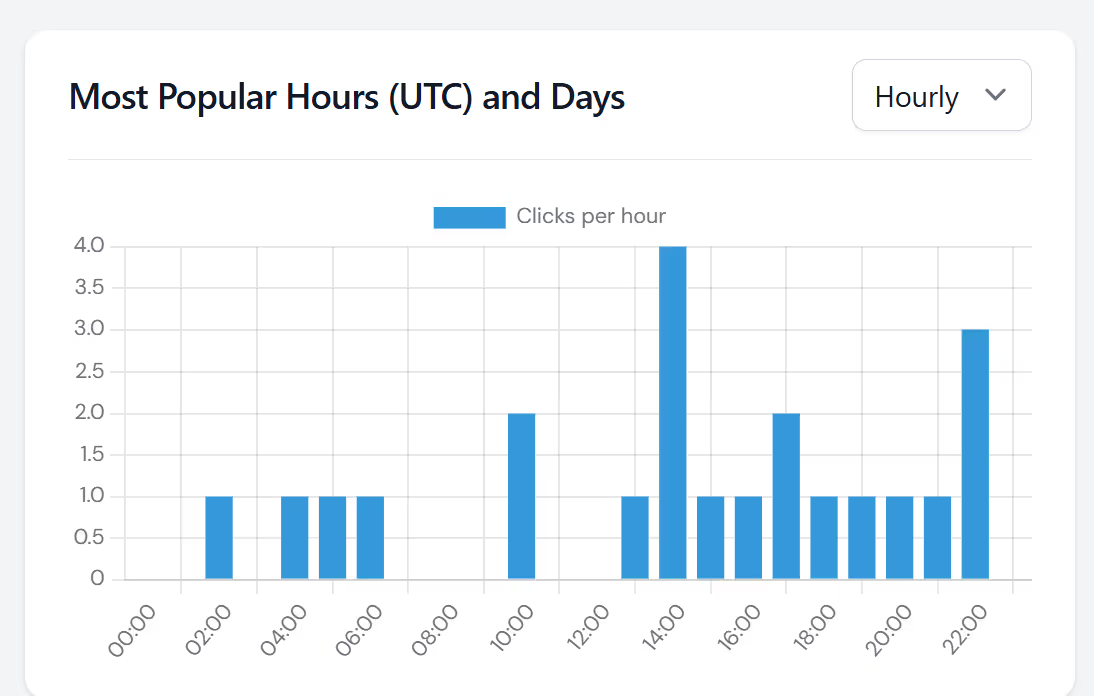
For a fuller walkthrough of the mechanics, see our guide on how to track clicks on short links. If your links carry affiliate IDs, our guide to short links for affiliate marketing explains why the shortener's click count and the network's own figures rarely agree.
FAQ
Which link shortener has the best free analytics? LinkShortener.io, if the test is how many of your clicks a free plan will count: all of them, on 20 links or QR codes a month, split by country, device type and busiest times, in the same analytics report Pro and Elite accounts see. On the other free plans, Rebrandly shows detailed analytics for 100 clicks a month and Dub tracks 1,000 events with 30 days of history (both checked 11 September 2026); Short.io tracks 50,000 clicks a month and TinyURL tracks none (both checked 10 September 2026).
Do link shorteners show who clicked? No. Click tracking is anonymous by design: you see counts, timing and, depending on the tool and plan, approximate location, device type and referrer, but never names, email addresses or identities. Any person-level attribution has to come from identifiers you add to your own URLs for your own systems to read.
Is there a link shortener with unlimited click tracking? Yes. There is no monthly cap on the clicks and scans LinkShortener.io records, and that includes the free plan. Elsewhere, unlimited tracked clicks sit on paid plans such as TinyURL Pro at $9/mo and Short.io Pro at $18/mo (both checked 10 September 2026). Bitly's free plan puts no ceiling on clicks to its 5 short links a month, but it counts none of them for you (its pricing page, checked 23 September 2026), whereas a free LinkShortener.io account records every one.
How long do shorteners keep click data? LinkShortener.io keeps a link's click history for as long as your account is open, on the free plan and the paid ones. Dub's pricing page gives fixed windows: 30 days on free, one year on Pro and three years on Business (checked 11 September 2026). TinyURL's free plan records no clicks to keep, and its $9/mo Pro plan lists two years of analytics history (checked 10 September 2026). Retention terms change, so confirm the current figure on the provider's own pricing page before you buy.
What is the best link shortener to track email campaign clicks? LinkShortener.io works well for email because each short link's clicks are counted with no cap, however big the send, and its Mailchimp integration works inside the app on the free plan, while GetResponse and ActiveCampaign users paste the short links into their emails by hand. Put a different short link behind each call to action and the report shows which one drew the clicks, when, and on desktop or mobile. Some email security filters open links before the reader does, so treat a burst of clicks in the first minute after sending with caution.
Do branded short links on my own domain get the same click tracking? Yes. A LinkShortener.io short link on your own domain, go.yourbrand.com/offer for example, has every click and scan counted with no cap, in the same kind of report as a link on the shared tli.sh domain. Basic at $13/month includes 1 custom domain, Pro at $34/month includes 3 and Elite at $260/month includes 10. Connecting it takes one CNAME record, and HTTPS is then set up automatically. Plan for one difference: links on your own domain stop redirecting if you cancel or move back to Free, whereas tli.sh links keep working.