NEWBroken Link Checker, on Pro and Elite: we check your short links and QR codes every day and flag any that break.See how it works →Broken Link Checker is here →
Home › Features › Link Shortener › Vanity URLs

Custom Short Links & Vanity URLs

A vanity URL is a short link where you choose the name after the slash, so you get yourbrand.link/sale instead of a random code. On LinkShortener.io you type that ending yourself when you create the link, on the Pro plan ($34/month) or Elite, and it stays fixed once the link is saved.

Written by the LinkShortener.io team · Reviewed by Shaun Reynolds, Founder · Last reviewed September 2026

Quick answer

A vanity URL is a short link with a custom slug you choose, such as yourbrand.link/sale, instead of a random code. LinkShortener.io custom slugs need Pro ($34/month) or Elite; your own branded domain starts at $13/month. Free and Basic endings are generated; a free account gets 20 links or QR codes a month, combined, on tli.sh.

Custom endings: what to know before you save

  • Who picks the ending: you, on Pro or Elite; on other plans it is generated
  • Renaming it later: not possible once the link is created
  • Changing where it goes: Pro and above, while the short link and its QR code stay the same
  • Your own domain: 1 on Basic, 3 on Pro, 10 on Elite, each connected by a CNAME record with HTTPS set up for you
  • Cancel or drop to Free: branded-domain links stop redirecting, while tli.sh links carry on
  • Clicks: counted on every plan with no cap, known bots filtered out

Plan limits from our pricing page; the rest confirmed by our team, September 2026.

What is a custom short link?

A custom short link is a short link where you pick the wording after the slash instead of accepting a random code. People also call it a vanity URL, a custom alias URL or a custom back-half. yourbrand.link/sale tells people where they are going; a code like /x7Kq2 tells them nothing.

You can customise two parts with LinkShortener.io. The slug (the words after the slash) is yours to choose on Pro and Elite. The domain (the part before the slash) can be one you own on any paid plan.

A chosen ending is what lets one branded domain carry a whole programme of campaigns: a college on go.college.ac.uk can run /openday, /clearing and /prospectus side by side and hand any of the three to a printer. Pro at $34 a month is where slug customisation starts, and the plan is priced for that scale, bringing 2,000 links or QR codes a month and three custom domains with it. A charity running one appeal a year will get more from Basic at $13, where the domain in front of the slash is already yours, even though the code after it is generated for you.

Why use a custom short link instead of a random one?

A chosen ending turns the link into something people can recall and recognise as yours; a random code gives them nothing to hold on to.

  • Brand identity: yourbrand.link/promo carries your name on every share, where a random short code carries nobody’s.
  • Trust: the ending gives people a readable hint of where the link leads before they click, which a string of random characters can’t do.
  • Easier to remember and type: one word after the slash can be recalled from a poster, a slide or a radio ad. A string of mixed-case characters cannot.
  • Consistency: the same format works across social posts, email, print and packaging, so your links look like they come from one place.

When should you use a custom alias URL?

  • Marketing campaigns: adverts, social posts and email campaigns, where the link is read as often as it is clicked.
  • Branded content: blog posts, articles and videos, so the link to each piece names the piece.
  • Events and promotions: webinars, product launches and offers, where people need to reach one page quickly from a slide, a stand or a flyer.

What do custom short links look like?

  • yourbrand.link/new-product: the launch page for a new product or service.
  • yourbrand.link/giveaway: a contest or giveaway entry page.
  • yourbrand.link/book-a-place: an event, webinar or conference registration page.
  • yourbrand.link/social: your social profiles behind one address that is easy to say aloud.
  • yourbrand.link/video: your latest video.

Why are readable custom slugs easier to click and share?

Because a link people can read is a link people can judge. A slug such as /spring-sale tells the reader what to expect, while a random code asks them to trust the sender blindly. That makes a readable link easier to click, easier to pass on and easier to type from print.

Readable slugs also survive being spoken: a presenter or podcaster can say “yourbrand dot link slash demo” and the listener can type it later.

One thing a custom short link does not do is change your search rankings. The short link redirects to your page, and search engines index the destination, not the redirect. Choose a slug for the people who will read it, not for a search engine.
How do you make a custom link name?

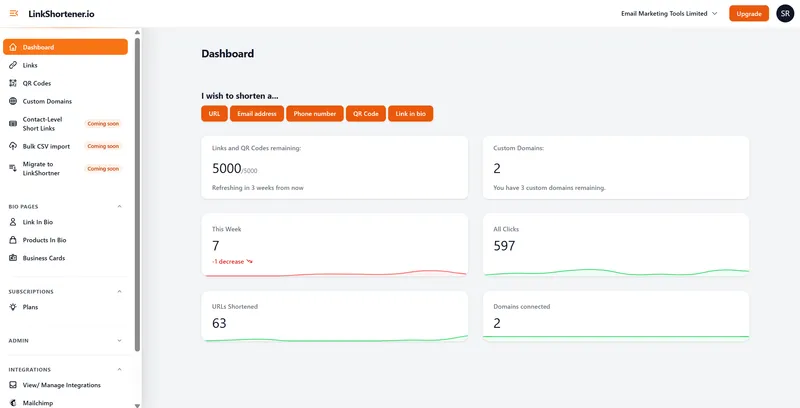
Pick URL on the dashboard, type the ending you want after the slash, add the destination and save. Typing your own ending needs a Pro or Elite account, and without a connected domain of your own the link sits on the shared tli.sh domain. A tli.sh ending is never given to a second account, so a common word such as /sale may already be taken there; if it is, add a second word, as in /shoe-sale.

  • Connect a branded domain (from the Basic plan, $13 a month) or keep the shared short domain. This sets the part before the slash.
  • Start a new link from the dashboard by choosing URL under “I wish to shorten a…”.
  • Type the custom slug, a short phrase such as /spring-sale.
  • Paste the destination URL, the page the link should open.
  • Read the ending back, then save and share.
LinkShortener.io dashboard with the "I wish to shorten a..." buttons (URL, Email address, Phone number, QR Code, Link in bio) above tiles for links and QR codes remaining, custom domains, this week's clicks and all clicks
Where a custom short link starts: the URL button on the LinkShortener.io dashboard. The capture comes from an earlier build of our test account, so its side menu and domain tiles don’t match today’s plans.

How do you pick an ending you won’t want to change?

Pick words that will still fit next year. The page behind a link can be swapped on Pro and above, so a timeless ending keeps working season after season while a dated one has to be retired.

  • Name the thing, not the date. /menu can open next season’s menu; /menu-sept-2026 can’t sensibly be reused.
  • Match the ending to where people meet it. A link read out in a radio advert works best as one plain word, such as /tickets; on a flyer, where it is only read, a hyphen can split two words, as in /open-day.
  • Keep tracking codes out of the ending. Put UTM tags on the destination instead (every plan includes them), so the reader sees /price-list rather than a string of campaign codes, and the campaign details still reach your web analytics. Google’s own URL builder guide for Analytics adds utm parameters to the destination URL in the same way.
  • Scan the printed proof. Test the QR code from the proof itself, not from your screen, before the print run goes ahead.

A charity might put yourbrand.link/appeal on a poster, a podcaster could send listeners to yourbrand.link/episode, and a sales team might print yourbrand.link/demo on a business card. None of those endings names a date or a campaign code, so each can stay in circulation for years while the page it opens is updated.

Custom short link questions, answered

What is a vanity URL?

A vanity URL is a short link whose ending you choose, often on a domain you own as well, so the address reads as words rather than a code, for example go.yourbrand.com/spring-sale. Custom short link and custom alias URL are other names for it; the custom slug is only the part after the slash.

Can I choose my own short link name?

Yes, when you make the link on the Pro plan at $34 a month, or on Elite, you type your own words after the slash, such as /spring-sale, where the generated characters would otherwise go; on Free and Basic those characters are picked for you.

Can I change the ending once the link is shared?

No. Once a link is created its ending is fixed on every plan; if you were hoping for a link name changer, the nearest thing is choosing the name at the start, which Pro and Elite allow.

What you can change, on Pro and above, is where the link goes: editing a short link swaps the destination while the short address stays exactly the same, which keeps shared posts and printed QR codes working. Free and Basic accounts don’t include destination editing. If you need a different name, create a new short link with the new slug and point it at the same page.

Can I use my own domain?

Yes, on any paid plan: Basic ($13 a month) connects 1 custom branded domain such as go.yourbrand.com, Pro ($34) connects 3 and Elite ($260) connects 10. Setting one up takes a single CNAME record at whoever hosts your DNS, and HTTPS is then set up automatically once the domain is added; our custom domain set-up guide shows each step. On Basic the ending after the slash is still generated, so go.yourbrand.com/sale needs Pro. If you cancel or drop to Free, links on your own domain stop working and QR codes carrying them stop too; links made on tli.sh keep redirecting.

Is a custom short link free?

A short link is free; choosing its ending is not. On a free account you get 20 links or QR codes a month from one shared allowance, each on tli.sh with a generated ending; no card details are asked for, and the links show no ads and have no expiry date. Picking the ending yourself starts on Pro at $34 a month, and putting links on your own domain starts on Basic at $13.

Do vanity URLs work with QR codes and analytics?

Yes. Each short link gets a matching QR code, and paid users creating a code in the app can choose their custom domain for it, so the code carries the branded link; our dynamic QR code generator page explains how those codes work. There’s no cap on counted clicks or scans, whatever the plan.

Even a free account’s report breaks clicks down by country, compares desktop with mobile, picks out the busiest hours (UTC) and days, and puts this week’s count beside the all-time total. Traffic from known bots and crawlers is filtered out of the click reports, and the click history is kept for as long as the account stays open.

Sign up today for free!

Open a free account for 20 links or QR codes a month, then upgrade to Pro when you want to write the endings yourself.

Free account required. No credit card needed.