Quick answer
A link shortener swaps a long web address for a short link that forwards visitors to the original page and can count each click. The count happens on the shortener's server, so your page needs no script or cookie. LinkShortener.io uses a 302 redirect and counts every click on every plan, leaving known bots and crawlers out of the totals.
A link shortener takes a long web address and turns it into a short one that redirects to the original. Anyone who clicks the short link is sent straight on to the full page, so the short version behaves exactly like the long one. And because every click passes through the shortener's server first, it can also count and analyse those clicks, which is something a plain link cannot do.
In short, a link shortener does three jobs: it shortens, it redirects, and it tracks. Almost everything else a shortener offers is built on top of those three.
How does a URL shortener work?
URL shortener is simply another name for a link shortener, and it works as a lookup plus a redirect. It saves your long address against a short code; when a browser asks for that code, the server finds the match, logs the visit and replies with a redirect to the long address. The example below follows exmpl.co/spring through each job.
1. Shorten the link
A shortener takes a long, messy URL (the sort with a folder path and a string of tracking parameters on the end) and swaps it for a short, tidy one. Something like example.com/products/spring-collection?ref=email&id=9f83a2 becomes exmpl.co/spring. The short version is easier to read, quicker to type, and far less likely to break when it is pasted into an email, a text message or a printed flyer. Nothing is lost on the way: the redirect delivers the full address you saved, so on LinkShortener.io the ?ref=email tag still reaches the page.
2. Redirect to the original
The short link does not hold your content. It points at it. When someone opens exmpl.co/spring, the shortener looks up the code and sends back a redirect that tells the browser where to go. The visitor lands on the real page a fraction of a second later, usually without noticing the hop.
That redirect comes in two forms. A 301 is a permanent redirect; a 302 is a temporary one.
The difference matters for tracking. Browsers are allowed to cache a 301 and skip the server on the next click, whereas a 302 is checked with the server every time; both rules are set out in RFC 9110, the HTTP standard. So a cached 301 can hide a repeat click from the count, while a 302 normally cannot.
LinkShortener.io sends a 302, so a reader who comes back through the same link is counted again. Other services vary, and you can check any short link: run curl -I followed by the link in a terminal (curl's -I option asks for the headers only), and the first line of the reply gives the status code. Our guide to how click tracking on short links works covers what else can keep a visit out of a report.
3. Track the clicks
Because the request passes through a server before it reaches your page, the shortener can record each click as it happens. Depending on the service, that can mean the number of clicks, the time of each one, an approximate location from the visitor's IP address, the type of device (read from the user agent) and, where one is passed, the referring source. None of this needs a cookie or a script on the destination page, because the measurement happens during the redirect. That is why you can even track a link to a page you do not own and could never add analytics to.
On a free LinkShortener.io account, the report for a link like this shows this week's clicks, total clicks, clicks by country, desktop against mobile, and the most popular hours (UTC) and days; Pro and Elite plans show those same analytics, with nothing added on top. To watch all three jobs on a link of your own, make one with our URL shortener on a free account, open it once, then check that its report has counted the visit.
Why people use a link shortener
Tidy links. A short link looks better and fits where a long one will not: a social media bio, a printed poster, a slide, or an SMS with a strict character limit.
Branded links. A link on a domain you own, such as go.yourbrand.com, tells the reader who is behind it before they click. That recognition builds trust in a way a shared, anonymous shortener domain cannot.
Measurement you cannot otherwise get. If you share a link to someone else's page (a press article, an app store listing, a partner's site), you normally have no way to see the response. Route it through a short link and you can count every click.
Editable destinations. A short link can be pointed somewhere new after it has been shared, so a printed poster or brochure need never go stale, even though the paper itself cannot be changed.
Who it helps most. A shortener suits anyone whose links leave their own website, where an analytics script cannot follow them: a social bio, a printed poster, podcast show notes, a partner site. If you only ever link between pages of a site you already measure, it buys you tidier addresses and little else. Testing that takes one month of real campaigns on a free account, whose allowance is 20 links or QR codes between them. The reports keep their value afterwards too: LinkShortener.io does not trim a link's history back to a recent window, so a campaign run now can still be read beside the same campaign a year from now, free accounts included.
What else does a modern link shortener do?
Beyond the three core jobs, most established tools add a layer of extras. A basic link shortener simply shortens, redirects and tracks; a fuller one usually also offers:
- Branded (custom) domains let you put your short links on a domain you own, such as
go.yourbrand.com, so every link carries your name instead of a shared one. LinkShortener.io's Basic plan ($13 a month) includes 1, Pro ($34) includes 3 and Elite ($260) includes 10. - QR codes: a QR code generator can point a code at the same short link, so a scan is tracked exactly like a click and the printed code can be re-pointed later.
- Link-in-bio pages give you one short link that opens a small landing page listing several links, made for the single "link in bio" slot on social profiles. LinkShortener.io offers them from Basic ($13 a month).
- UTM tags are campaign parameters added to the destination URL so your analytics platform can label which source, medium and campaign each visit came from.
- Link expiry: on some services a link can stop working after a chosen date or a set number of clicks, which suits time-limited offers. LinkShortener.io offers it by date, not by number of clicks, from Basic ($13 a month), and sends visitors to a fallback page you choose once the date passes.
- Password protection: some services put a password in front of a link so only the people you share it with can follow it through; LinkShortener.io includes it from Pro.
- Bulk creation means importing a spreadsheet and generating hundreds or thousands of short links in one go, rather than making them one at a time. On LinkShortener.io that is a bulk CSV import, part of both Pro ($34 a month) and Elite, which you run yourself by uploading a CSV from your dashboard.
- Device and geo redirects send different visitors to different destinations, for example visitors on a phone or tablet to a short mobile sign-up page while anyone on a laptop or desktop sees the full website, or UK visitors to a price list in pounds. LinkShortener.io handles both with country rules and device rules, and its device rules sort each click into just two groups, mobile or desktop, with tablets counted as mobile; the screenshot below shows a country rule. Some tools can also split traffic between two versions of a page.
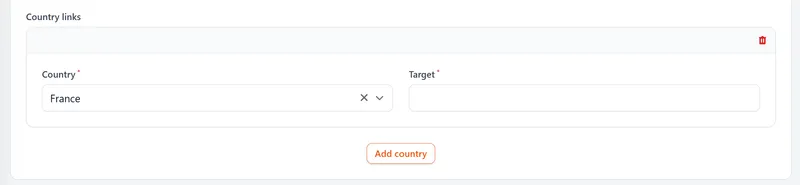
Many of these sit on paid plans, and you will not need them all. Together, though, they are why "link shortener" now describes a small marketing tool, not just a URL trimmer.
Static links vs dynamic links
Whether a short link is static or dynamic decides what a shortener can actually do for you.
A static short link is fixed. The short code is tied to one destination and cannot be changed afterwards. It still passes through the shortener, so its clicks can be counted if the service logs them, but it will point at the same page for as long as it exists.
A dynamic short link is the editable kind. The short code maps to a destination you can change at any time, and because every click routes through the server, it can be counted. Dynamic links are what make the editable destinations described above possible, and they are what most people mean today by "short link".
On LinkShortener.io, changing where a link points after it has gone out comes with Pro ($34 a month) and Elite. The same split applies to QR codes: a static code has the destination baked into the pattern, while a dynamic one encodes a short link, so it can be measured and re-pointed without reprinting.
Is a link shortener safe, and what are the downsides?
Yes. A short link is an ordinary redirect, the same mechanism much of the web already runs on. The catch is that it hides its destination: nobody can tell from exmpl.co/x7k2 where it leads, and that has long been used to disguise unsafe links. So a short link is only as trustworthy as the service and the person behind it.
Two things reduce the risk. First, prefer links on a recognisable branded domain, because a link that reads go.yourbrand.com/offer reassures the reader in a way a random shared domain never will. Second, if you are ever unsure of an unfamiliar short link, some shorteners offer a preview page, and independent link-checker tools will reveal the destination before you commit.
Two independent expanders you can paste one into are CheckShortURL, which describes itself as an “expand link facility”, and WhereGoes, which traces each redirect a link passes through on the way to its final page (both read 23 September 2026). A first look needs no tool at all: hover over a link on a desktop, or long-press it on a phone, to see which address it really uses, because friendly link text can hide a short link. If that address turns out to be a short link too, paste it into an expander. For the rest of the routine, our guide to vetting a short web address before you open it sets out five checks, from reading the site name to reporting a bad link.
Editable links add one more risk: a link that was harmless on day one can be re-pointed, or the page behind it can change. So LinkShortener.io checks new links and QR codes for malware and phishing when they are created, once more about 2 hours later, and again whenever the main destination of a link is edited. A destination that fails the check at the moment of saving is refused, and our team can switch off a link that turns out to breach our terms of use. If one of our links still looks wrong, use the report-a-link form: on weekdays our team checks every report within 2 hours and acts on it at once.
We call the wider risk link reassignment: a short address that once led to one page starts sending people to another, either because its owner changed the destination or because the service gave the same code to another user. The second route is written into at least one service’s rules: shorturl.at’s terms of service (read 23 September 2026) say short URLs without at least one click a month are disabled, and that disabled ones may then be made available to other users. LinkShortener.io has no rule that switches off a link for going unclicked.
The last downside is longevity, which depends on the service and on whose domain a link sits. On LinkShortener.io, links and QR codes on our shared short domain go on redirecting after you cancel or downgrade, and free links never expire. A custom domain is a paid feature, so if you cancel or move to Free, the short links on it stop working, and so do QR codes made from them.
The domain stays yours, though, and that is what makes branded links portable. If yours sit on your own domain with another provider, our sales team can move those branded links to LinkShortener.io with one DNS record change on your side, while the existing links keep redirecting. Links on a provider's shared domain can't move like that.
FAQ
What is a link shortener? A link shortener is a tool that turns a long web address into a short one that redirects to the original. Paste in the long URL, get a short link back, and anyone who clicks it is forwarded to the full page. Because each click passes through the tool, it can also be counted.
How does a link shortener work? Each short link is a small record that maps a short code to a destination URL. When someone opens the short link, the shortener's server looks up the code, logs the click, and returns a redirect (a 301 or a 302, depending on the service) that sends the browser on to the real page, all in a fraction of a second. For a live LinkShortener.io link the reply is a 302, so repeat visits still go through the server and are counted.
Should a short link use a 301 or a 302 redirect? Use a 302 if you want every click counted, because browsers don’t cache it by default, and that is the redirect every LinkShortener.io short link sends. Our guide to tracking clicks sets out when a 301 or a 302 makes sense, including the search argument for a 301.
Are link shorteners free? Most have a free tier, though what it includes varies. TinyURL's free plan allows 30 links a month and its pricing page (checked 10 September 2026) lists no click tracking on it; Rebrandly's free plan shows detailed analytics for 100 clicks a month (checked 11 September 2026). But a free LinkShortener.io account covers 20 links or QR codes a month in total and counts every click on them, and a branded custom domain starts on Basic at $13 a month. Check the limits before a campaign goes out, not after.
Can you track clicks on a shortened link? Yes, and it is one of the main reasons to use one. Every click passes through the shortener's server, which can log the count, the time, the device type and an approximate location, and on some services the referring source too. It cannot tell you who the person is by name, and IP-based location is an estimate rather than a precise fix.
Do short links expire? Not on their own. Some tools let you give a link an end date or a click limit on purpose; otherwise a short link lasts as long as the service runs it and any plan it relies on. On LinkShortener.io a link only gets an end date if you give it one, on Basic and above, with a fallback page for visitors after the date; its free links never expire, while links on your own custom domain need a paid plan and stop redirecting if you cancel or move to Free.
Is a link shortener safe? The technology is safe; the thing to watch is that short links hide their destination, so a short link is only as trustworthy as the service and the person sharing it. Stick to reputable shorteners, prefer links on a recognisable branded domain, and use a link preview or checker tool if you are unsure where an unfamiliar short link leads.