Quick answer
Short links belong in email signatures because a signature goes out with every message you send, to people you already know. A raw URL looks messy and breaks when lines wrap; a LinkShortener.io link stays on one line, counts every click and uses 1 of a free account's 20 links or QR codes a month (one pool for both).
Trying a signature link costs nothing, as the free account needs no card. Free links sit on tli.sh, a short domain that every free account shares, so a link carrying only your name needs a domain of your own, which Basic ($13 a month) adds. A word ending such as /book, and the option to change where the link points after hundreds of emails have gone out, arrive with Pro, at $34 a month.
An email signature is the only piece of marketing that goes out with every message you send. Nobody opts in, nobody unsubscribes, and it lands again and again in front of the exact people you already deal with: clients, prospects, suppliers.
If you send thirty emails a day, that is thirty small impressions on a warm audience at no extra cost. Yet most signatures treat the space as a formality: name, title, phone, and either no link or a long URL pasted in raw. The signature is prime link real estate, and the link is usually the worst thing in it.
The problem with pasting full URLs
Paste a full address into a signature and three things go wrong.
It looks a mess: under a tidy four-line sign-off, a grey rope of slashes and query strings is the visual equivalent of a coffee stain.
It breaks. Narrow reply windows wrap long lines, and when a URL wraps, some clients only link the first fragment, so the recipient clicks and lands on a broken address.
It looks suspicious. Tag the link for analytics and the tags are on display: ?utm_source=signature&utm_medium=email reads as machine clutter, and people have spent years being told not to click links they cannot read. A signature is meant to build confidence; an unreadable link quietly does the opposite.
And after all that, a pasted URL tells you nothing: you will never know whether anyone clicked.
What does a branded short link fix?
go.yourbrand.com/book fixes all three problems at once. It fits on one line in any client, and it reads as plain English with your name in it, so the recipient knows where it leads before clicking. The redirect behind it counts each click on the way through, with nothing added to the page it opens.
The branded part matters more in a signature than almost anywhere else. A random-character link on a shared shortener domain is short but anonymous. It could lead anywhere, which is exactly the doubt a signature exists to remove. A link on your own domain, set up once with custom branded domains, is short and visibly yours, and nobody outside your account can put links on it.
Changing the destination later is a separate feature, on Pro and Elite, and a signature is where it earns its keep: the link lives on in hundreds of sent emails, so when the page behind it moves, one edit keeps every old copy pointing somewhere useful.
What should an email signature link to?
One or two links, each with one job. The strongest candidates:
- A booking page. "Book a call" is the classic, because it is an action the recipient can take the moment the thought occurs.
- The latest offer. Worth the space if you actually refresh it. With an editable link, the refresh is a destination change, not a signature redeployment.
- A bio page. For founders and consultants, the person is the product; a bio link answers "who am I dealing with?" before the recipient asks. On LinkShortener.io a digital business card (Basic and up) does this job, and its Save Contact button hands over your details as a vCard. If your LinkedIn profile already does that job, a LinkedIn URL shortener link shortens it and counts the clicks.
- A case study. For agencies and freelancers, one flagship piece of work shows what hiring you looks like better than a homepage does.
Two more depend on what you run. If your newsletter goes out through Mailchimp, connect it and your sent campaigns appear in LinkShortener.io, ready to shorten for a "Read the latest issue" line. That link-up works on a free account. GetResponse has no link-up inside the app, but a short link pasted into a GetResponse newsletter is counted all the same.
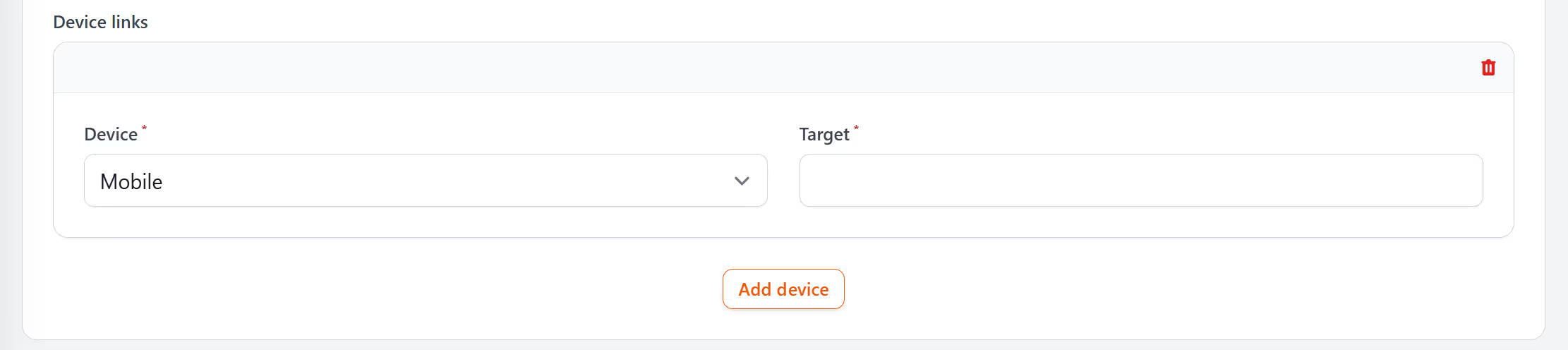
If you send through ActiveCampaign, there is nothing to link up: paste the short link into the newsletter yourself. If you publish an app, one link with device rules (Pro and Elite) can send anyone who taps your signature link on a phone or tablet to a download page carrying both the App Store and Google Play buttons, while computer users get the link's main destination, so make that a page about the app. A device rule can only tell mobile from desktop, so that one download page has to work for whatever phone your reader carries.
Whichever you pick, stop at two: every extra link dilutes the click data that tells you what is working.
Your email address needs no short link in a signature, because the reader already has it in the From line of your message. A short email link opens a new message to you in the reader's email app, so it earns its place where there is no From line, such as a social bio or a QR code on a flyer. The email shortener guide covers those links, which need Pro ($34 a month) or Elite.
A signature link pays back first for people whose work already runs through one-to-one email: salespeople, recruiters, account managers, consultants, anyone writing to named individuals all day. Where email is an occasional errand, or where most of it goes to colleagues who already know where everything is, the link has little to do and the monthly counts stay too small to read. For that first group the free tli.sh link is enough to test the idea, and the one upgrade worth making early is a domain of your own at $13 a month, because what makes a signature link work is the reader seeing a name they recognise before they click.
How do I add a short link to my email signature?
It takes five steps, ending with a signature link whose clicks land in your dashboard.
- Create the link. Paste the destination into your link shortener, with any tracking tags already on the address: tags such as
utm_source=signaturesurvive the redirect, so your analytics still receives them, while the signature itself shows only the short link. A readable ending (/book,/offer,/work) suits a signature best. On LinkShortener.io you choose one as you create the link, on Pro or Elite, and it can't be renamed afterwards, so settle on the word first. A free link gets a random ending, which looks less tidy under your name but has its clicks counted all the same. - Decide how it will appear. Hyperlinked text ("Book a call") is tidier; a visible branded URL lets cautious recipients read exactly where they are going. Pick one and keep it consistent.
- Open your email client's signature settings. Gmail, Outlook and every mainstream client have a signature editor in their settings. In Gmail it is the Signature section under See all settings, as Google's Gmail signature guide shows. Paste the short URL there, or select your chosen text and attach the link to it.
- Send yourself a test. Check it on a phone as well as a desktop, click the link on each, and confirm both clicks appear in your dashboard. If they are not there yet, wait briefly and reload the page; the report does not update by itself.
- Roll it out and leave it alone. Give the link a full month before judging it, because signature traffic is a drip, not a spike.
Reading the numbers
Signature links have no launch spike, just a steady trickle that follows your sending volume. The useful measure is clicks per link per month, compared across months and across links.
That comparison is the whole point. If the case-study link earns clicks every month and the offer link has not been touched since spring, the offer has lost its place, so swap it. What deserves the most-repeated space in your correspondence stops being taste and becomes evidence. And the evidence keeps: nothing ages out of a LinkShortener.io report while your account is open, on free and paid plans alike, so next year you can pick Last Year in the link's report and still see every click your signature brought in this year.
A free account's report is enough for this job. For each link it shows the country behind every click, whether the click came from a desktop or a mobile device, this week's count next to the total so far, and the busiest hours and days. Hours are given in UTC, so add one to read them as UK time between the last Sunday in March and the last Sunday in October, while British Summer Time runs.
For a signature, the device split and the timing say the most: a high mobile share together with evening peak hours suggests people act on your emails away from their desks, so the page behind the link has to work on a small screen.
Two caveats. The numbers will be small (a signature reaches dozens, not thousands), so read trends rather than single events. And not every click is human. LinkShortener.io filters known bots and crawlers from its counts, but some company mail systems open links to check them before delivery without announcing themselves as bots; a click that arrives in the same minute as your email is more likely the recipient's mail filter than the recipient.
One signature format, whole team
The same logic scales across a company. Give everyone an identical signature layout, but issue each person their own link: go.brand.com/meet-sara, go.brand.com/meet-tom. Named endings like these need Pro, which also lets you add colleagues to the account with Teams.
Two things fall out of that. Each person's link has its own report, so you can see whose correspondence actually drives clicks (usually the people in sales and support conversations). And each link can point somewhere personal, such as an individual booking calendar, while the brand presentation stays uniform. When someone changes their calendar tool, you edit one destination; nobody reinstalls a signature, and every email already sent still points to the right place.
A QR code in a signature?
On screen, mostly no: your recipient is already holding a device, so clicking beats scanning.
The exception is where email meets paper. PDF letterheads, proposals and printed correspondence get read in places where a link cannot be clicked. There, a QR code is the bridge back to a screen. Use a dynamic code, which encodes a short link: scans are recorded exactly as clicks are, and on Pro a code on last year's documents can be repointed without reissuing anything.
On LinkShortener.io the code already exists: each short link has one. A free code carries no watermark across its squares, though the words "created by linkshortener.io" appear in small type beneath it, and they would print on your letterhead too; on a paid plan they go, but only from codes you download again after upgrading. Any plan, free included, can save the code as an SVG, which stays sharp at any print size. Paid plans can also put the code on your own domain.
FAQ
Should I put a link in my email signature at all? Yes. It is recurring space in front of a warm audience, and it costs nothing. It works best as a next step the recipient plausibly wants, such as booking a call, and one or two links with a clear job will outperform a crowded footer.
Do short links in signatures trigger spam filters? Spam filtering weighs many signals (sender reputation, authentication, content, volume), and a single link rarely decides the outcome. The realistic risk sits with shared shortener domains, which have carried enough abuse over the years that some filters treat them warily. Free LinkShortener.io links use one of those, tli.sh. Every link there belongs to a registered account and is screened for malware and phishing, at creation and again about 2 hours later, but nobody can promise how a filter scores a shared domain. A branded short domain takes the shared reputation out of the picture, because only your account can create links on it, though no domain guarantees inbox placement: your own sending reputation and authentication still count for more.
Can I track clicks on my email signature links? Yes. The click passes through the shortener on its way to your page and is counted there, so the page itself needs no tracking code. LinkShortener.io counts those clicks with no cap on any plan, the free one included.
Can I change where a signature link points without editing the signature? Yes, if your plan includes destination editing; on LinkShortener.io that means Pro or Elite, while Free and Basic keep the destination fixed. The short link stays the same in every signature already deployed and every email already sent; you edit the destination behind it. Seasonal offers, moved pages and retired booking tools become a thirty-second change instead of a company-wide signature update.
What happens to my signature links if I cancel? It depends on the domain they use. Cancel, or drop back to the free plan, and anything on the shared short domain carries on redirecting. Anything on your own domain does not: custom domains belong to the paid plans, so those links stop opening, and so do QR codes made with them, printed letterheads and proposals included. A signature spreads those links through every email you send, so only put a branded link there if you mean to keep the plan.