Quick answer
To make a custom QR code with your logo, create a dynamic code, use error correction level H (automatic on LinkShortener.io once a logo is added), centre a logo well under 30% of the code area, then download SVG for print, PNG for screen. Recovery runs 7% at L, 15% at M, 30% at H. By the 10x rule a 2cm code reads from about 20cm, an A3 poster wants 10-20cm. LinkShortener.io's free account covers 20 new links and QR codes a month altogether: plain codes, downloadable as SVG or PNG, with every scan counted. Logos, colours and dot styles all need Basic ($13 a month), while templates and repointing a printed code are Pro ($34 a month).
Making a custom QR code takes five minutes. The order matters more than the tool:
- Choose dynamic, not static, because a dynamic code lets you change the destination after printing.
- Enter the destination URL.
- Use error correction level H before you style anything. LinkShortener.io switches to H by itself as soon as you add a logo or icon.
- Upload your logo and keep it well under 30% of the code area, dead centre.
- Set your colours: dark code, light background, strong contrast.
- Test it on an iPhone and an Android, at the distance people will really scan from.
- Download SVG for print and PNG for screens. LinkShortener.io offers both on every plan.
The rest of this guide covers each step, why error correction is what makes a logo possible, and how big the code needs to be.
Static or dynamic? Decide this first
Static or dynamic is the single most important choice here, and it can't be undone later.
A static QR code encodes your destination directly into the pattern. The URL is the code. It works forever without any service behind it, but you can never edit it and never count scans. Print 5,000 flyers with a static code, then move the landing page, and the flyers are dead.
A dynamic QR code encodes a short redirect URL instead. Scanning it hits that short link, which forwards to wherever you've currently pointed it. Because the destination lives in a dashboard rather than the printed pattern, you can change where the code goes at any time without reprinting, and see how many scans it got and when.
A dynamic QR code generator is simply a tool that creates codes of this second type. It issues and hosts the short redirect, and gives you an editable destination plus scan analytics. The physical pattern is no different; the difference is entirely in what's encoded.
Use static only for things that genuinely never change, like a Wi-Fi credential card. Use dynamic for anything printed, commercial, or worth measuring.
Back to those 5,000 flyers, now printed with a branded code from LinkShortener.io's QR code generator with logo upload on the Basic plan. Behind the pattern sits an ordinary short link, and its scan report (the same on Free and Basic) shows which days and hours (UTC) bring the flyer the most scans. What Basic can't do is repoint the printed code. That takes Pro or above, so settle the final URL before the print run.
Volume and proximity to your logo are what justify the $13 Basic fee, so a print run, packaging, a table card or an exhibition stand is where the styling belongs. One code on a slide or in an email signature can stay plain; what it still gets is a scan history kept for as long as the account stays open, so a code you reuse year after year keeps its whole record.
Step-by-step: making the code
1. Enter your destination
Paste the full URL, including https://, and add UTM parameters if you use them. Tags already on the address survive LinkShortener.io's redirect, so scans reach your analytics still tagged. Make sure the destination page is mobile-friendly, because almost every scan is on a phone.
2. Use error correction level H
Error correction is redundancy built into the pattern. The four levels below come from ISO/IEC 18004, the published QR code specification, and each recovers a different share of a damaged or covered code:
| Level | Approximate recovery |
|---|---|
| L | ~7% |
| M | ~15% |
| Q | ~25% |
| H | ~30% |
Higher levels add more redundant data, so the pattern gets denser. That's the trade-off: a level H code packs more modules (the little squares) into the same space, so it needs printing slightly larger to stay readable. Our guide to how QR codes are generated explains the maths behind the recovery.
Set this before you add a logo, because some tools regenerate the pattern when the level changes and undo your styling. Some generators hide the setting entirely; with those, keep any logo small and trust a printed proof. LinkShortener.io is one of them, but it chooses for you: plain codes use M, and it moves to H as soon as you add a logo or icon. Denso Wave, the company that developed the QR code, names M as the level most often chosen in its explainer on QR error correction.
3. Add your logo
Level H is what makes a logo possible. Because a level H code still decodes with up to 30% of it lost, an image can cover part of the pattern and the scanner reconstructs the missing data. Three rules:
- Keep the logo well under 30% of the code's area. The 30% refers to the area, not the width. Thirty per cent is level H's entire budget, so aim nearer 20% for print. A logo that looks modest can quietly eat more of the pattern than you think.
- Put it dead centre. The three large corner squares are the finder patterns, and the smaller one is the alignment pattern. Cover any of those and the scanner can't orient the code at all. The centre is the safest place to lose data.
- Re-test every time. Adding a logo changes the decode margin. A code that scanned perfectly at 25% coverage may fail at 32%.
Use a logo with a solid background or clear silhouette. Semi-transparent logos that let the pattern show through underneath confuse scanners. To turn an area into a width, use our QR code logo sizing guide.
4. Choose colours, dot shapes and a frame that still scan
Colours are where most people personalise a code, and where a good-looking code can quietly stop scanning. Scanners look for contrast between dark and light modules. Everything else is decoration.
- Dark code on a light background. This is the arrangement scanners expect.
- Avoid inverted codes. Light modules on a dark background fail on a meaningful number of scanner apps and older phone cameras. It looks striking and costs you scans.
- No low-contrast gradients. A gradient is fine if every part stays clearly darker than the background. Gradients that fade towards the background colour are where codes break.
- Avoid yellow, light green and pale colours, which photograph much lighter than they look on screen.
- Keep the quiet zone clear. That's the blank margin around the code, and Denso Wave's guide to the QR code area asks for four modules of it on every side. Designers cut into it constantly to save space, and it's a leading reason a valid code won't scan. Nothing goes in there: no text, no border, no background image.
Dot shapes matter less than colour, with one catch: on a 2cm business-card code, rounded or dotted modules carry less ink than squares, so squares are the safer choice at small sizes. Whatever the style, the three corner squares must stay recognisable. In LinkShortener.io the dot shape, margin size and hex colours sit on the Design step (Basic and above), and our QR code styling options page covers each one.
A frame wraps the code in a border with a short instruction, such as ‘Scan for tonight’s menu’; keep it outside the quiet zone. In LinkShortener.io that is the Add Custom Border toggle, covered in our guide to framing a QR code.
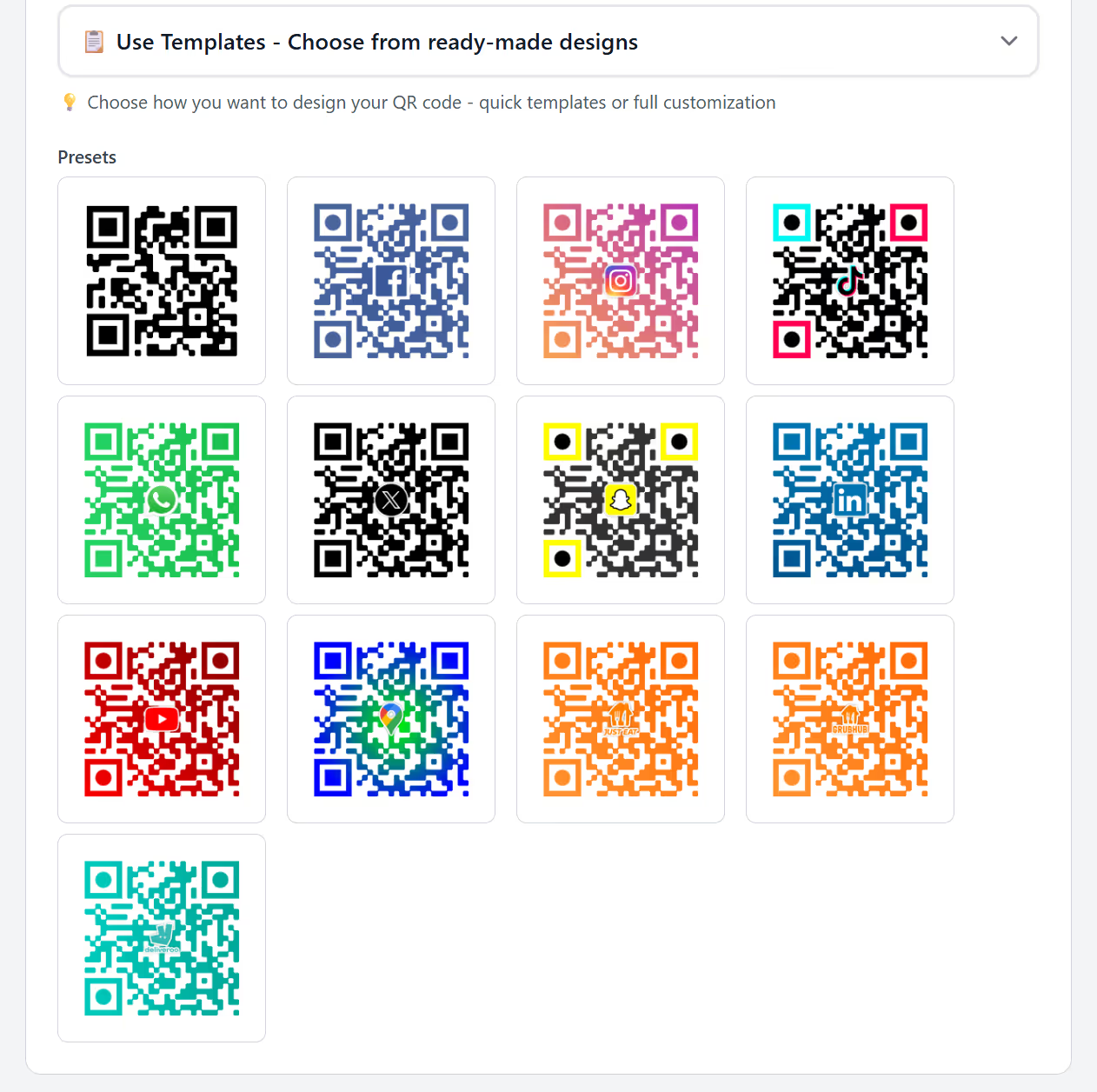
Pro adds ready-made designs, shown below, from a plain preset to brand-coloured ones for Facebook, Instagram, TikTok, YouTube and Maps. Test a preset in print just as you would your own palette (see our QR code template presets). The YouTube preset suits a code that opens a video or a channel, and our page on shortening YouTube links explains which YouTube address to paste as its destination.
5. Test before you commit
Test on both iOS and Android: the native camera apps use different decoders, and a marginal code often works on one but not the other. Test in realistic conditions too, with the code printed at final size and checked at the actual distance and lighting. A code that scans from 10cm on your monitor tells you nothing about a shop window at 3 metres.
What size should a QR code be?
The widely used rule of thumb is minimum scan distance ≈ 10× the width of the code. A 2cm code scans reliably from about 20cm; to be scanned from 5 metres, the rule asks for a 50cm code.
This is practical guidance, not a formal standard. Camera quality, lighting, print quality and how much data you've encoded all shift it. Treat it as a floor and go bigger when you can. For other distances, try the QR code size calculator or our QR code viewing distance chart.
| Placement | Typical scan distance | Sensible code size |
|---|---|---|
| Business card | 10–15 cm | 2–2.5 cm |
| Flyer or leaflet | 20–30 cm | 2.5–3 cm |
| Product packaging | 15–25 cm | 2–3 cm |
| Indoor poster (A3) | 1–2 m | 10–20 cm |
| Shop window | 2–3 m | 20–30 cm |
| Exhibition banner | 3–5 m | 30–50 cm |
| Billboard | 20–50 m | 2–5 m |
Placement matters as much as size. Put the code where a phone can reach it and hold steady (chest to eye height, not at floor level). Shop-window codes must survive glare, so avoid glossy laminate. A billboard code nobody can safely stop to scan is decoration, whatever size you print it.
Shorter destination URLs also produce simpler patterns with larger modules, which scan from further away at the same size. That's another benefit of dynamic codes.
Which file format should you download?
Two formats do the job: SVG is for anything that goes to a printer, PNG for anything read on a screen.
- SVG for anything printed. A vector format stores the code as shapes, so it scales to any size with crisp edges. Send it to your printer. Some other tools also export EPS, which works the same way; LinkShortener.io downloads SVG and PNG.
- PNG for screens: websites, emails, slides, social posts.
- Avoid JPG. Its compression creates soft artefacts around the hard edges of the modules, which is exactly wrong for a scanner.
Printing a small raster PNG is the classic failure. A 300×300 px PNG stretched across the 297mm width of an A3 poster gives under 26 DPI, so module edges become blocky staircases and the decoder can't separate dark from light. Enlarging a file doesn't add detail, it just spreads the same pixels over more paper.
QR Code is a registered trademark of DENSO WAVE Incorporated, which developed the format in 1994.
Common mistakes
- Logo too big. Past 30% coverage you're outside what level H can recover.
- Never testing. The most common failure. Test the final artwork, not the preview.
- Low contrast. Pale colours, inverted codes, fading gradients.
- No quiet zone. Text or graphics crowding the edge of the pattern.
- A static code on printed material. The destination changes eventually. It always does.
- Testing on only one platform. iOS and Android decode differently, so check both.
- No fallback URL alongside. Print a short, typeable URL next to the code. Some people won't scan and some phones will fail; the printed link costs you nothing.
- Not checking how long the link will last. A code that opens a tli.sh short link (the shared domain) goes on scanning if you ever cancel or switch back to Free. Point it at a short link on your own custom domain instead and it goes dead at that moment, flyers and all.
FAQ
How do I make a custom QR code for free? You can make and test one free on LinkShortener.io, but not style it. The logo, colour and dot-style options are Basic-plan features ($13 a month), so a code made on the free account comes out plain. It still downloads as an SVG or a PNG, ready for print or screen. Free codes have no watermark across the code itself; a small credit line, 'created by linkshortener.io', sits below it instead, and a fresh download after upgrading leaves that line off.
How do I add a logo to a QR code? Use error correction level H (LinkShortener.io switches to it by itself when you add a logo), then upload your logo and centre it. Level H recovers up to 30% of an obscured code, which is what lets an image sit over the middle without breaking the scan. Keep the logo well under 30% of the code's area, then re-test on both iOS and Android. Our add a logo to a QR code page shows where the upload sits in LinkShortener.io.
What is a dynamic QR code? A dynamic QR code encodes a short redirect URL rather than your final destination. Because the destination sits in a dashboard, you can change where the code points at any time without reprinting, and you can count scans. A static code encodes the destination permanently and can do neither.
What is a dynamic QR code generator? A tool that creates dynamic codes. It issues and hosts the short redirect behind the code, lets you edit the destination later, and reports scan numbers. The printed pattern looks no different from a static one; the difference is entirely in what's encoded.
How big should a QR code be for a poster or billboard? Apply the 10× rule of thumb: the minimum scan distance is ten times the code's width. An A3 poster read from 1–2 metres wants a 10–20cm code; a billboard read from 30 metres needs a code 3 metres wide. Go larger wherever the layout allows.
What can you customise on a QR code? On the Design step of LinkShortener.io's Create QR Code form you can change the dot style, the margin size and the colours (typed in as hex codes), put a centre icon or your own logo in the middle (a JPG, PNG or WEBP file of up to 2 MB) and turn on a custom border. Every one of those needs Basic ($13 a month) or a higher plan, and the ready-made templates start on Pro ($34 a month). However far you take the styling, the code has to stay dark on a light background, so scan a printed proof before the full run.
Can I change a QR code after it's printed? Only if it's dynamic. A dynamic code's destination is editable at any time, so the printed artwork stays valid. A static code's destination is baked into the pattern permanently, so if it changes, you reprint. That's why dynamic is the safer default for print. On LinkShortener.io, repointing a printed code is included from Pro upwards, at $34 a month.