Quick answer
To shorten a URL, paste the long link into LinkShortener.io, click Shorten, and copy the short link it gives you. A free LinkShortener.io account lets you shorten 20 links or QR codes a month with unlimited click tracking and no card, and you can change a short link’s destination after sharing it (Pro plan and above).
Worked example
Say a newsletter sends readers to a sale page at https://www.example.com/collections/spring-sale?utm_source=newsletter&utm_medium=email&utm_campaign=spring-2026, an address 111 characters long.
Pasted into a free account, it comes back as a tli.sh link with a short random ending. The three utm_ tags travel through the redirect untouched, so Google Analytics still files the visit under the newsletter, while LinkShortener.io records the click on its way through. Open the short link yourself before the send: the sale page should load with the tags still in the address bar.
Shortening a URL takes under a minute and needs nothing but a browser and a free account. Below are the exact steps on LinkShortener.io, followed by plain answers to what people ask next, from making the short URL custom and posting it on X to whether shortening a URL is legal.
How do I shorten a URL in 5 steps?
- Copy the long URL. Select the full web address in your browser’s address bar, or in the email, document or message where it sits, and copy it.
- Paste it into LinkShortener.io. Log in to your free URL shortener account and paste the long URL into the destination field. If you arrive from our URL shortener home page, the Get Started button beside its long-URL box opens free sign-up first, and you paste the link once you are in.
- Click Shorten. LinkShortener.io creates the short link on its shared short domain, tli.sh. On the Basic plan and above you can use your own branded domain instead.
- Copy and share the short link. Paste it into an email, a social post, an SMS, a bio, a printed flyer or a QR code. The short link redirects to the long URL you pasted.
- Track the clicks. Every click on the short link is counted, on every plan including Free. Open its report in the free link tracker to see how many times it has been clicked and when.
In Chrome, the keyboard is a quick way to copy a page’s address: press Ctrl+L to select everything in the address bar, then Ctrl+C to copy it (Cmd+L, then Cmd+C, on a Mac). The full address is then on your clipboard, ready to paste into LinkShortener.io at step 2.
Create your free LinkShortener.io account and follow the five steps above. Free account required. No credit card needed.
How do I shorten a URL for free?
Use the free short link generator at LinkShortener.io: open a free account, then follow the five steps above. It costs nothing, needs no card and lets you make 20 a month, with links and QR codes counted together. Google’s own free option, goo.gl, has made no new links since 2019, and our Google URL shortener alternative page explains what happened to it.
Free links go out on the shared tli.sh domain with no ads in front of them, and UTM tags and tagging are included. When you reach the 20-link limit your existing links keep working and keep tracking clicks; new ones wait for the next month at no extra charge, unless you move to a paid plan from $13 a month. Every plan is listed on the pricing page.
The LinkShortener.io free allowance of 20 a month fits people who share a handful of links at a time: a shop posting one offer, a tutor handing out a reading list, a charity printing a single address on a poster. Shortening is worth the extra step wherever a web address has to be typed out, read aloud, printed or counted, and it adds nothing to a link sitting inside a web page as ordinary anchor text, where the reader never sees the address at all. One link a day uses the free 20 inside three weeks; the allowance is 350 a month on Basic and 2,000 on Pro.
How do I make a custom short URL?
A short URL has two parts you can make your own: the ending after the slash, from the Pro plan at $34 a month, and the domain in front of it, from the Basic plan at $13 a month.
The slug is the ending: with vanity URLs you replace the random characters with your own words, so the link reads as a product name or an offer rather than a code. Settle the wording before you save, say spring-sale for the example above, because an ending is fixed once the link exists and can’t be renamed. The domain is the part before the slash: a custom branded domain swaps tli.sh for one you own and point at us with a CNAME record (1 domain on Basic, 3 on Pro, 10 on Elite).
How do I shorten a URL on my phone?
The same five steps work in Safari or Chrome on any phone: copy the long URL, open LinkShortener.io in the browser, paste, shorten and copy the result. There is no app to install and nothing changes between iPhone and Android.
The tap-by-tap version, including how to pin the tool to your home screen, is in how to shorten a link on iPhone or Android.
Does a short link save characters on X (Twitter)?
No. X wraps every link in a post in its own t.co address and counts it as 23 characters however long the original is, so the 111-character sale link above takes up exactly as much room as a tli.sh link (X’s developer documentation, checked 15 September 2026).
What shortening still gives you on X is measurement: a separate short link for the post has its own click report, so its clicks are not mixed up with the newsletter’s.
Can I shorten many URLs at once?
Yes. Pro accounts ($34 a month) and Elite accounts ($260) both get it through a self-serve bulk CSV import. Pick Bulk CSV import in your dashboard, download the template, put one long URL on each row and upload it, up to 200 rows a file. Every row still turns into a separate short link with its own click report, and the imported links come out of the plan’s monthly allowance of 2,000 (Pro) or 5,000 (Elite) links or QR codes.
Free and Basic don’t include bulk import, so on those plans you shorten URLs one at a time, up to 20 and 350 a month, though either plan can ask us for a quote on a larger batch.
Can I change a short URL after sharing it?
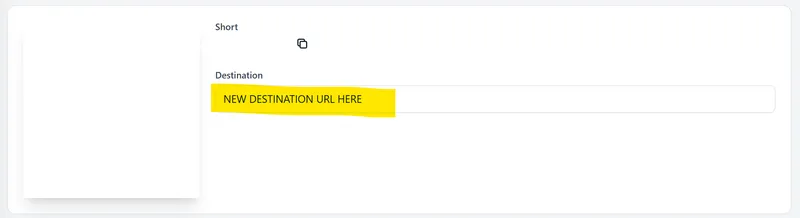
Yes, on Pro ($34 a month) and above. You can edit the destination of an existing short link at any time without changing the short link itself, and anyone who already has it, in an email, a post or a printed QR code, is sent to the new destination from the moment you save.
This is the practical reason to shorten a URL before it goes to print or to a large list. If the spring sale page from the example moves after the newsletter has gone out, you point the short link at the new address and every copy already in an inbox follows it. Free and Basic don’t include destination editing, so on those plans check the long URL is final before the short link goes out.
How do I add a QR code to a short URL?
Use the QR code generator: paste the URL and LinkShortener.io creates a dynamic QR code whose scans are counted the same way clicks are, on every plan including Free. Each code uses one of the month’s links or QR codes: 20 on Free, 350 on Basic and 2,000 on Pro.
A free code has no watermark on the pattern itself but carries a small ‘created by linkshortener.io’ line underneath; paid plans drop that line, so download the code again after upgrading. If the code is going to print, download it as an SVG, which the free plan already allows. The Basic plan at $13 a month lets you add a logo to a QR code and use your own colours, and pre-built QR templates come with Pro.
Is it safe to shorten a URL?
Yes, when you use a reputable service. A short URL is a redirect: it sends the visitor to the destination you set and does not alter the destination page. Because a short URL hides the destination, add a few words of context when you share one so recipients know where it leads.
On our side, the long URL is checked for malware and phishing when you click Shorten in step 3 and checked once more about 2 hours later, so a page that turns bad soon after the link is made can still be caught. A long URL that fails the step 3 check is refused without anyone having to ask. Anyone can flag a suspect link through the report a link form, and on weekdays someone on our team picks it up within 2 hours.
Is it legal to shorten a URL?
Yes. A short URL is an ordinary redirect, the same mechanism a website uses when a page moves, so shortening a link is as lawful as sharing the long address. Under our terms of use, whoever creates a short link is responsible for where it leads.
Those terms rule out links to illegal or infringing content, spam, phishing and malware, and links that pass you off as someone else, a point to keep in mind when you choose the words for a custom ending.
Do short URLs expire?
No. LinkShortener.io short URLs keep redirecting with no end date, and the Free plan itself is not a trial that ends. If you want one to end, Basic and above let you give a link an expiry date, after which visitors go to a fallback page you choose.
Links on your own domain are the exception to plan for: a custom domain comes with a paid plan, so if you cancel or drop to Free, short links on it stop redirecting, and so does any printed QR code that points at one; links and codes on tli.sh keep working either way.
Frequently asked questions
Do I need an account to shorten a URL?
Yes. LinkShortener.io asks you to create a free account before you shorten a URL, so your links, click reports and QR codes are saved in one place. The account is also where each link’s click history lives, and it stays there for as long as you keep the account open, free or paid.
How do I make a shortened URL?
To make a shortened URL, sign in to LinkShortener.io, paste the long address, click Shorten and copy the tli.sh link it creates; a free account shortens 20 a month with no card. Before sharing, open the new link once on your phone, then reload its click report a little later: that visit should be listed as its first click. Then file it in a folder, which every plan includes, Free too.
How do I shorten a URL without Bitly?
Copy the long URL, paste it into LinkShortener.io, click Shorten and copy the result. Bitly’s free plan allows 5 short links and 2 QR codes a month, but on LinkShortener.io a free account’s 20 a month can go on links, QR codes or any mix of the two.
Bitly’s free allowance taken from its pricing page on 10 September 2026.
Can I shorten a URL in Chrome or Safari without an extension?
Yes. LinkShortener.io runs in the browser, so you shorten a URL by opening the site in Chrome, Safari, Edge or Firefox, pasting the long URL and clicking Shorten. There is no extension or app to install.
Can I shorten a Google Forms, Google Drive or YouTube link?
Yes. Any public web address that doesn’t break our terms of use can be shortened, including Google Forms, Google Drive share links, YouTube videos and long product pages. Paste the full link exactly as you copied it, including any tracking parameters, and the short link will redirect to it.
Does shortening a URL improve SEO?
No. A short URL is a redirect to your existing page; it is not a ranking factor and does not change how the destination page ranks. Use short links for tidier sharing, editable destinations and click tracking, not for search rankings.
How do I see how many people clicked my short URL?
Open the link in your LinkShortener.io account to see its click report. On a free account that report gives the running total, this week’s count, a breakdown by country, desktop versus mobile, and the hours (UTC) and days that bring the most clicks; Basic, Pro and Elite accounts get that identical analytics report. Those free figures count clicks rather than people, and known bots and crawlers are left out.
Is a URL shortener the same as a link shortener?
Yes. URL shortener and link shortener describe the same tool: a service that turns a long web address into a short one that redirects to it. LinkShortener.io describes the same product on its URL shortener and link shortener pages.